
AI Configuration: BYOK Sales Intelligence for SuiteCRM
Modern sales leaders often struggle with the “Reporting Gap” in SuiteCRM — the hours wasted exporting data to Excel just to identify which deals are stalling. Revenue Engine AI closes this gap by transforming raw CRM data into an intelligent command center. By configuring your own AI key, you shift from manual data prep to proactive leadership, receiving executive-grade summaries and coaching priorities in under 10 seconds.
The result is a frictionless workflow where Revenue Engine AI narrates your pipeline health, allowing you to focus on closing deals rather than building spreadsheets.
Understanding the Built-In Intelligence Engine (No API Key Required)
Even without an external API key, Revenue Engine AI provides immediate value through its Built-in Intelligence Engine. This rule-based system runs entirely within your server environment and provides a deterministic analysis of your SuiteCRM data — no external calls, no cost, always on.
How It Works
The built-in engine consists of five specialised modules that process your live CRM data:
- DealRiskScorer: Evaluates each deal based on four factors — close date urgency, rep activity staleness, stage-to-probability gaps, and deal size exposure.
- PipelineAnalyzer: Detects structural issues such as stage concentration or critical coverage gaps.
- RepProfiler: Ranks representatives by activity ratios and conversion efficiency versus the organisational average.
- ForecastEngine: Calculates projected attainment using a weighted pipeline with recency discounts for inactive deals.
- NarrativeGenerator: Produces a plain-English summary of your pipeline state based on detected signals.
Action Triggers: Pipeline Signals
The engine automatically fires Live Signals to the Revenue Command Center. Common signals include:
- COVERAGE_CRITICAL: Fired when open pipeline is less than 0.8x the quarterly target — indicating severe under-coverage.
- STAGE_CONCENTRATION: Fired when too many deals are clustered in a single pipeline stage (e.g., Negotiation).
- STALL_WARNING: Triggered when multiple high-value deals have had no stage change in 14+ days.
- ZERO_PIPELINE_REPS: Identifies team members with no active deals in the current period.
Built-In Engine vs BYOK AI — At a Glance
| Feature | Built-In Engine | BYOK AI (Gemini / OpenAI / Claude) |
|---|---|---|
| Cost | Free (Always On) | Per-request (uses your API credit) |
| Analysis Style | Deterministic / Rule-based | Narrative / Nuanced Coaching |
| Data Privacy | 100% Local | Data sent to LLM provider via browser |
| Output | Signals & KPI badges | Executive briefings & coaching notes |
How to Configure Your AI Provider (Single Smart Key)
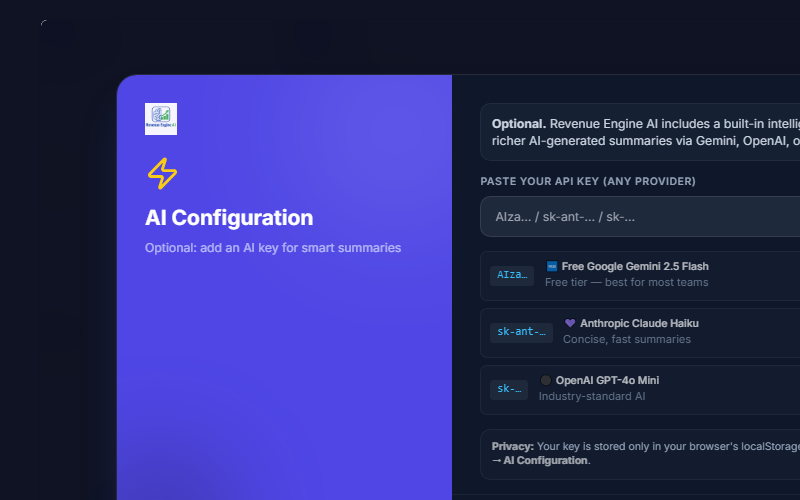
From v1.6.0, Revenue Engine AI uses a single smart key input. You paste one key and the system automatically detects your provider from the key prefix — no need to configure separate fields for each provider.
Step-by-Step: Google Gemini (Recommended — Free Tier)
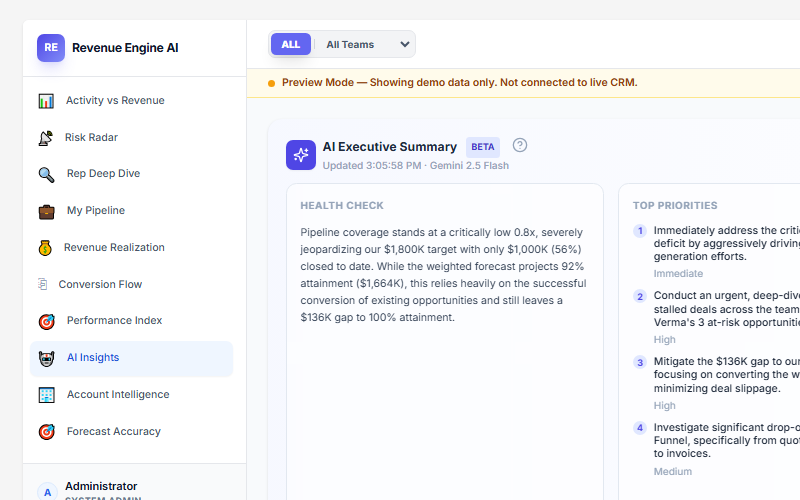
Google Gemini is the recommended provider for most teams because it offers a generous free tier and fast response times via the Gemini 2.5 Flash model.
- Navigate to Settings via the gear icon in the sidebar.
- Open the AI Configuration — BYOK accordion.
- Visit aistudio.google.com and sign in with your Google account.
- Click Get API Key → Create API Key.
- Copy the key (starts with
AIza...) and paste it into the Your AI API Key field. - Click Save Changes. The system displays the Google Gemini badge to confirm detection.
Using OpenAI or Anthropic Claude
The same single key input field works for all three providers. The system auto-detects based on the key prefix:
- OpenAI GPT-4o Mini: Paste a key starting with
sk-.... The system displays the OpenAI badge. - Anthropic Claude Haiku: Paste a key starting with
sk-ant-.... The system displays the Anthropic badge.
Get your OpenAI key at platform.openai.com/api-keys and your Anthropic key at console.anthropic.com.
Provider Priority and Automatic Fallback
If you have configured multiple keys, Revenue Engine AI uses this priority order — automatically switching to the next provider if the primary one hits a quota limit (HTTP 429):
- Gemini (Primary / Free)
- OpenAI (Secondary)
- Anthropic (Tertiary)
This means your Monday morning pipeline review is never interrupted by a single provider hitting rate limits.
Data Privacy and Local Storage Security
A core design principle of Revenue Engine AI is user privacy. Unlike traditional SaaS tools, Revenue Engine AI is a “Passive-Safe” extension — it makes zero schema changes and never sends your data to Zybroz servers.
Local-Only Key Storage
Your API keys are stored exclusively in your browser’s localStorage. They are never transmitted to Zybroz. The keys are stored under these local keys:
reai_gemini_keyreai_openai_keyreai_anthropic_key
Browser-to-LLM Data Flow
When you click Generate Insights, data flows as follows:
- The PHP bridge extracts anonymised KPI data and deal signals from your SuiteCRM database.
- Your browser bundles this data into a structured prompt.
- The request is sent directly from your browser to the AI provider (Google, OpenAI, or Anthropic).
- The AI response is rendered in your dashboard UI.
Your raw CRM records are never sent. Only aggregated KPI context and deal-level signals are included in the prompt.
Role-Based Data Scoping
Even when AI Insights are enabled, the PHP bridge enforces data visibility before anything is sent:
- Admins: Access to all organisational data.
- Managers: Limited to their assigned Security Groups.
- Reps: Can only generate insights based on their individual pipeline.
A rep with their own Gemini key cannot use it to access another rep’s data — the PHP data bridge enforces role boundaries before the prompt is constructed.
Revenue Engine AI v1.7.2 · Built by Zybroz · support@zybroz.com