
Optimize Sales Performance: Rep Deep Dive Coaching & 1:1s
In most sales organisations, preparing for weekly 1:1 coaching sessions is a manual, high-friction process. Managers are often forced to export static reports from SuiteCRM, pivot data in Excel, and cross-reference activity logs just to understand why a specific rep is falling behind.
Revenue Engine AI eliminates this administrative burden. By transforming raw SuiteCRM data into a high-fidelity Rep Deep Dive, the platform allows managers to zoom from company-level health directly into individual performance scorecards — so that 1:1 sessions focus on strategic growth and deal-winning behaviours, not data verification.
Reading the Rep Deep Dive Layout
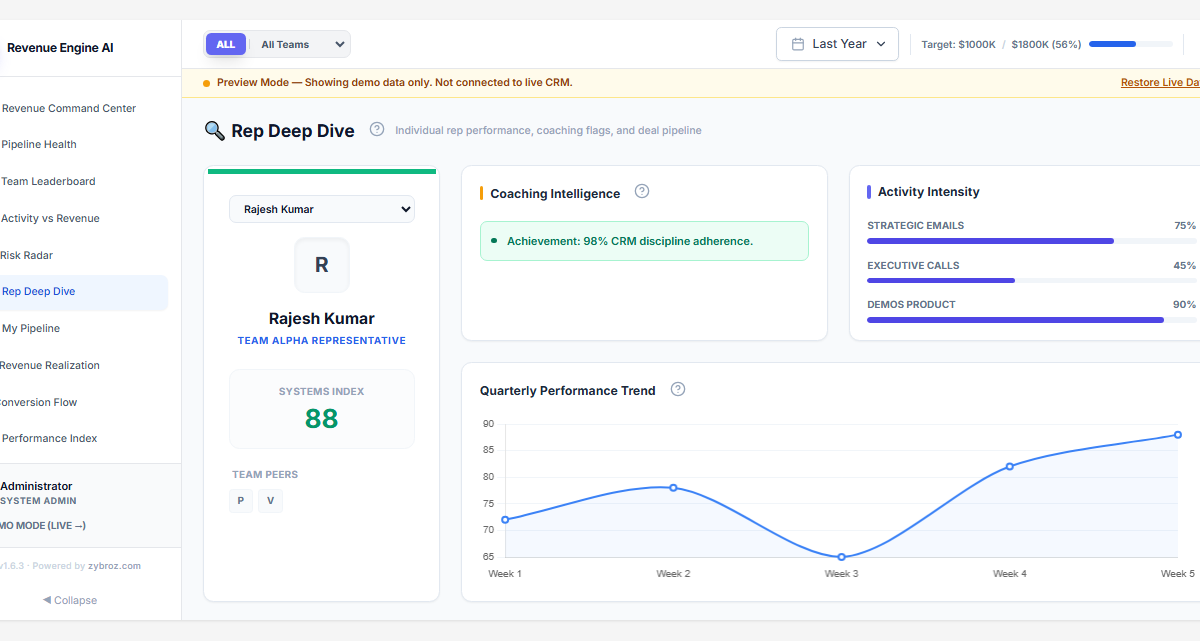
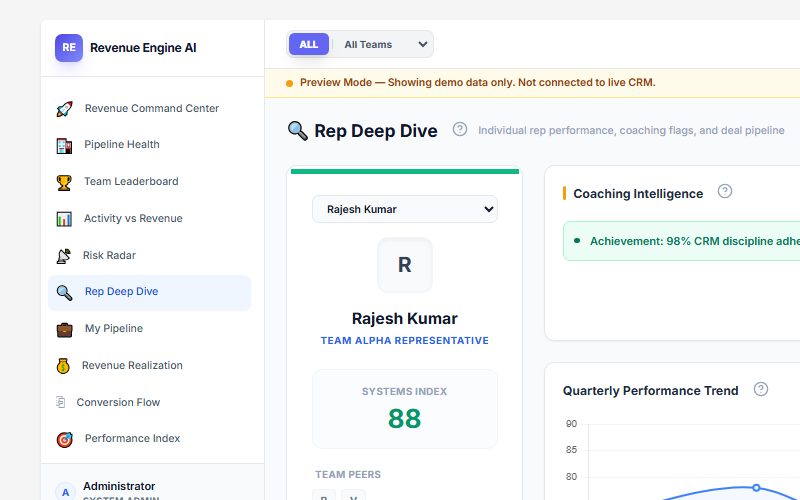
The Rep Deep Dive is organised into four panels loaded simultaneously when you select a rep from the dropdown at the top of the view.
Rep Profile Card (top-left)
Shows the rep’s name, team assignment, avatar, Systems Index score (0–100), and Team Peers — avatar chips of the other reps in the same security group, allowing quick comparison context.
Coaching Intelligence (top-centre)
Displays automated coaching flags generated by the built-in intelligence engine. Examples include achievement flags (“98% CRM discipline adherence”) and risk flags (“3 stalled deals requiring attention”). This panel surfaces the single most important coaching signal for the rep without requiring the manager to dig through the deal list first.
Activity Intensity (top-right)
A horizontal bar chart showing the rep’s activity breakdown across three tracked categories:
- Strategic Emails — email activity logged against opportunities
- Executive Calls — call records linked to deals
- Demos Product — meeting/demo records linked to opportunities
Each bar shows the rep’s score as a percentage of team average, making it easy to spot which activity type is below par.
Quarterly Performance Trend (bottom)
A line chart showing the rep’s Systems Index score week by week across the current quarter. An upward trend indicates improving momentum; a dip mid-quarter followed by recovery signals a stalled patch that was addressed.
The Systems Index Score
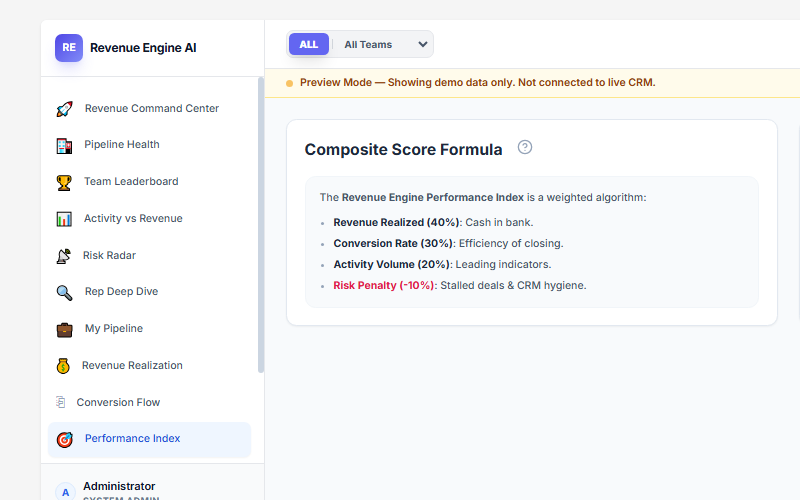
The Systems Index (displayed as “SYSTEMS INDEX” in the rep profile card) is the composite score that also appears in the Team Leaderboard’s Score column. It uses the same weighted algorithm:
| Metric | Weight | Description |
|---|---|---|
| Revenue Realized | 40% | Cash in bank — closed-won revenue vs the individual quarterly target. |
| Conversion Rate | 30% | Efficiency in moving opportunities through to “Closed Won.” |
| Activity Volume | 20% | Leading indicators — calls, meetings logged against opportunities. |
| Risk Penalty | −10% | Deductions for stalled deals (14+ days no stage change) and inactivity (7+ days no activity). |
Note on naming: The standalone Performance Index view in the sidebar shows the full team’s composite score distribution (Elite / Core / Risk tiers). Inside Rep Deep Dive, the same score is labelled “SYSTEMS INDEX” on the individual rep card.
Action Trigger: If a rep shows high activity but low conversion rate, focus the 1:1 on deal qualification and proposal quality. If a rep shows high revenue but low activity, they may be relying on legacy accounts — discuss pipeline generation for next quarter.
Reviewing Active Pipeline and Activity History
A high-level KPI summary only tells part of the story. To provide effective coaching, managers need to inspect the health of the current pipeline and the recency of sales activities.
Pipeline Risk Assessment
The Rep Deep Dive lists all active deals with their values, stages, and expected close dates. Revenue Engine AI applies risk badges to highlight where intervention is required:
- Overdue Deals: Any opportunity with a close date in the past is automatically flagged.
- Stalled Deals: Flagged if there has been no stage change in 14+ days.
- High-Risk Accounts: Accounts where the optimism gap (discrepancy between deal stage and probability) is too high.
Activity Intensity and Last-Touch History
The system tracks last-touch data by querying SuiteCRM’s calls_opportunities and meetings_opportunities join tables:
- Silence Badges: Deals silent for 8–20 days show an amber badge; those silent for 21+ days show a rose badge.
- Activity Breakdown: The view shows a summary of the rep’s activity volume across calls, meetings, and tasks for the selected period.
Action Trigger: During the 1:1, review every deal showing a silence badge of 8+ days and assign a specific “Next Best Action” — such as a follow-up call or a multi-threading email to a new stakeholder — to be completed within 24 hours.
Coaching Workflow: Before, During, and After the 1:1
To maximise the impact of the Rep Deep Dive, follow this structured coaching workflow:
-
Preparation (Before the 1:1):
Select the representative from the rep dropdown at the top of the Rep Deep Dive. Review their Systems Index score, Coaching Intelligence flags, and Activity Intensity bars. Identify 2–3 specific deals to discuss. -
Identify Bottlenecks:
Use the deal list to see which specific stage has the most overdue or stalled deals. Use the Conversion Flow data to identify if the rep is losing deals at a specific funnel step (e.g., high drop-off from Proposal to Negotiation). -
AI-Generated Guidance (Optional):
If a BYOK AI key is configured, use the AI Insights module to generate a coaching brief. The AI names specific stalled deals and provides a data-driven narrative on the rep’s current trajectory and recommended priorities. -
Export for Documentation:
Use the PDF Export toolbar to save a snapshot of the rep’s scorecard. Attach this to a SuiteCRM activity log or email it to the rep as a summary of the session and agreed actions.
Pro Tip: If you are presenting to senior leadership, toggle Demo Mode in the sidebar footer. This loads the stable 18-rep enterprise dataset, allowing you to demonstrate coaching excellence without exposing sensitive live CRM data.
Revenue Engine AI v1.7.2 · Built by Zybroz · support@zybroz.com