
Automate SuiteCRM Deal Prioritisation with My Pipeline
For sales representatives, the primary challenge is often “analysis paralysis” — staring at a long list of opportunities in a CRM and not knowing which one to call first. Revenue Engine AI solves this by transforming static SuiteCRM data into an actionable, risk-sorted dashboard.
The My Pipeline view is a personalised daily command center designed to reduce friction and ensure no high-value deal dies silently. By categorising opportunities based on urgency and inactivity, it allows reps to focus on selling rather than manual sorting.
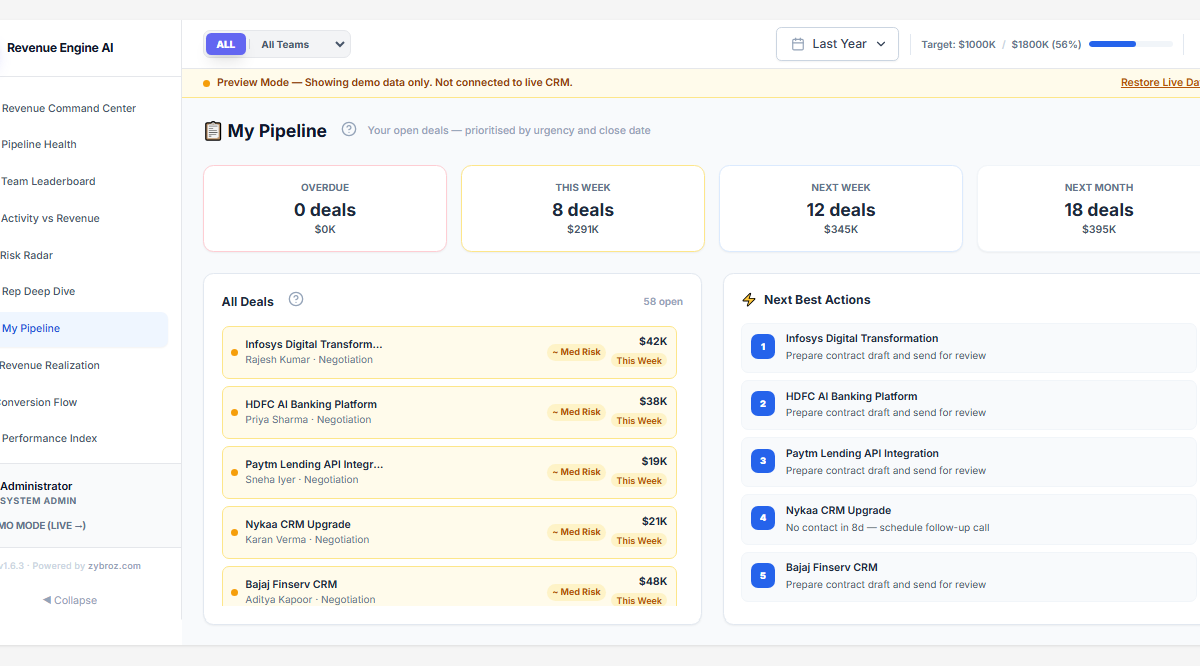
My Pipeline: Daily Deal Prioritisation
Summary tiles
At the top of the view, four summary tiles give an instant count and total value of your deals by urgency bucket:
- Overdue — deals whose close date has already passed
- This Week — deals closing within the current 7-day window
- Next Week — deals closing in the following week
- Next Month — deals closing in the month ahead
Each tile shows both the deal count and the total pipeline value in that bucket — a quick read of how much revenue is at each urgency level before you review individual deals.
The My Pipeline module serves as the primary daily workspace for sales representatives. Unlike standard CRM list views, this dashboard uses a risk-weighted sorting algorithm to surface deals requiring immediate attention at the top of the screen.
How It Works
The system queries your SuiteCRM database via the secure PHP data bridge to pull live opportunities assigned to the logged-in user. It then evaluates each deal against three risk factors:
- Close Date Urgency: How soon is the expected close date?
- Last Touch Latency: How many days since the last logged call or meeting?
- Stage-Specific Stalling: Is the deal stuck in a stage without progressing?
How to Use It
- Access: Click My Pipeline in the sidebar.
- Filter: Use the Date Range picker at the top to focus on deals closing “This Month” or “This Quarter.”
- Prioritise: Review deal cards from top-left (highest risk/priority) to bottom-right (lower urgency).
Deal List — Risk Badges and Close Date Labels
Each deal in the list shows a small coloured dot indicator on the left and a risk text badge on the right. The close date urgency is shown as a label (This Week, Next Week, Next Month, or Overdue) next to a risk level badge (~ Med Risk or ~ High Risk). This is not a card-background colour system — the deal rows have a subtle indicator, keeping the list clean and scannable.
| Close Date Label | Risk indicator | Logic | Action Trigger |
|---|---|---|---|
| Overdue | High Risk dot | Expected close date has already passed | Call today. Update the close date or close/disqualify the deal. |
| This Week | Med Risk dot | Deal is scheduled to close within the current 7-day window | Verify all stakeholders are aligned for a signature or next step. |
| Next Week | Med/Low Risk dot | Deal closes in the upcoming week | Schedule a follow-up now to ensure no roadblocks emerge. |
| Next Month | Low Risk dot | Deal closes in the month ahead | Monitor — ensure activity is logged regularly to avoid silence badges. |
Pro Tip: If a Red badge is showing for a deal with an unrealistic close date, navigate to the native SuiteCRM opportunity record to update the date. The dashboard will re-categorise the card on next refresh.
Deal Last-Touch Alerts (Silence Badges)
Even if a close date is far in the future, a deal can fail due to lack of momentum. Revenue Engine AI monitors the calls_opportunities and meetings_opportunities join tables to calculate exactly how many days have passed since the last meaningful interaction.
Silence Badge Logic
- No Badge (≤ 7 Days): Deal has healthy, active engagement.
- Amber Silence Badge (8–20 Days Silent): Deal is beginning to cool. The rep is alerted to perform a “pulse check” — a quick touchpoint to re-establish momentum.
- Rose Silence Badge (21+ Days Silent): Critical stall. These deals are penalised in the Performance Index and require an immediate re-engagement strategy.
Action Trigger: Any deal showing a Rose Badge should be the first candidate for a “Next Best Action” to prevent it from falling into the “Stalled” category on the Risk Radar, which triggers a −10% penalty in the Performance Index.
Following Rule-Based Next Best Actions
To eliminate the cognitive load of deciding how to follow up, each deal card includes a Next Best Action suggestion. These are deterministic prompts generated by the built-in intelligence engine based on the opportunity’s current stage and activity history.
Contextual Suggestions (Examples)
- Stage: Prospecting + 8d Silence → “Schedule Discovery Call”
- Stage: Negotiation + Overdue Close Date → “Send Final Proposal Follow-up” or “Review Discount Terms”
- Stage: Proposal + No Active Meetings → “Book Technical Review”
Business Outcome
By following these rule-based prompts, sales teams maintain a higher Revenue Velocity. Instead of spending time deciding which email to send, reps follow the suggested action to maintain a consistent engagement cadence across their entire pipeline.
Data Requirements & Permissions
Role-Based Visibility
- Regular Reps: Only see deals assigned directly to them.
- Managers: Can use the Team Filter to view the My Pipeline screen for any specific rep — an effective coaching tool for 1:1 sessions without exposing the full organisation.
For Badges to Display Correctly
Ensure the following fields are maintained in SuiteCRM:
- Opportunity Amount: Required for value-based sorting and Performance Index calculation.
- Close Date: Drives the Red / Amber / Yellow risk badge logic.
- Activities Linked to Opportunities: Calls and Meetings must be “Related To” the Opportunity for silence badges to calculate correctly.
Pro Tip: If the dashboard shows 0 activities, go to Settings → Data Sources and ensure Activity Data is toggled On.
Revenue Engine AI v1.7.2 · Built by Zybroz · support@zybroz.com