

Every SuiteCRM administrator has been there. You find a promising extension on the SuiteCRM Marketplace, install it via Module Loader, and three minutes later your navigation bar is broken, your Repair & Rebuild is hanging, or your users are seeing a white screen. A rollback takes an hour you do not have.
The fear of extension-related instability is legitimate — especially on SuiteCRM 7.x, where the Extension framework, compiled files, and database schema are tightly coupled in ways that can cause cascading failures when an extension is poorly built.
This guide explains the specific architectural choices that make an extension safe to install, how Revenue Engine AI implements them, and what to look for when evaluating any SuiteCRM plugin before you install it in production.
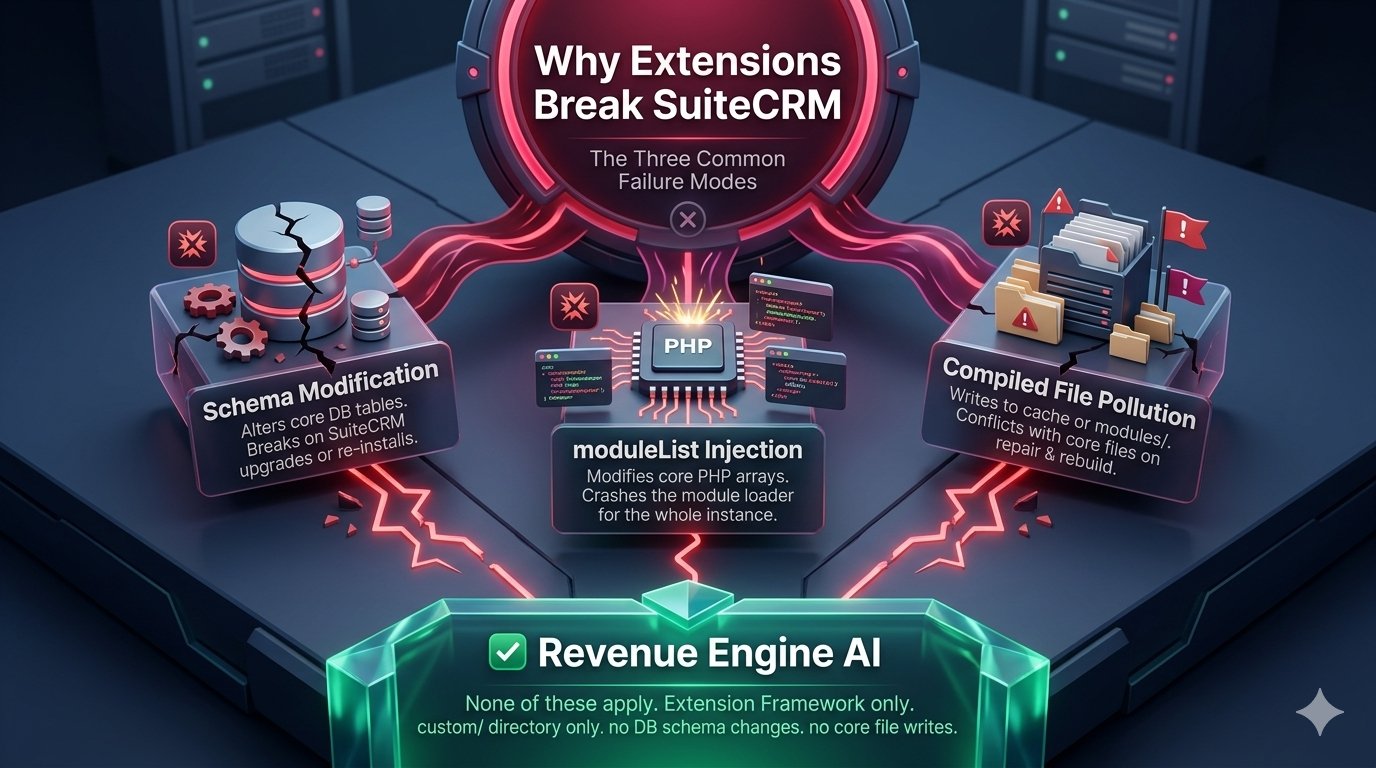
Why Extensions Break SuiteCRM: The Three Common Failure Modes
Most extension-related CRM instability falls into one of three categories:
1. Schema Modifications
Extensions that create new database tables, add columns to existing SuiteCRM tables, or modify schema definitions can cause problems that persist even after uninstallation. If the uninstall hook fails to clean up correctly, schema debris remains in the database — causing query errors or corrupted data.
2. Module Registration Conflicts
SuiteCRM has a mechanism called $moduleList that registers modules with the CRM core. On SuiteCRM 7.x, registering a module via $moduleList is generally safe. However, the same registration on SuiteCRM 8.x triggers the Angular shell to attempt loading a remoteEntry.js file — which custom extensions do not have — causing the entire CRM shell to crash. Extensions that register via $moduleList without understanding this distinction can destabilise SuiteCRM 8.x installations and are risky even on 7.x if the extension is later used on an 8.x upgrade path.
3. Compiled File Pollution
SuiteCRM uses a compiled Extension file system where individual extension contributions are merged into shared compiled files (e.g., application.php, en_us.php). If an extension writes incorrectly formatted code into these shared compiled files — such as a bare return statement inside a block that other extensions also contribute to — it can break all plugins that rely on that compiled file, not just the offending one.
What “Passive-Safe” Architecture Means
Revenue Engine AI is built on what we call a Passive-Safe architecture. This is a specific set of constraints that guarantee the extension cannot destabilise your SuiteCRM instance:
Zero Schema Changes
Revenue Engine AI does not create, modify, or drop any database tables. It reads from existing SuiteCRM tables (opportunities, users, calls, meetings, quotes, accounts, securitygroups) using standard SELECT queries. Your database schema after installation is identical to your database schema before installation.
No $moduleList Registration
Revenue Engine AI does not register itself via $moduleList, $beanList, $beanFiles, or $modInvisList. Access to the dashboard is provided through three safer mechanisms:
- Entry Point: A custom URL entry point (
?entryPoint=RevenueEngineAI) registered via the EntryPointRegistry Extension - GlobalLinks: A link in the user profile dropdown (top-right corner) registered via the GlobalLinks Extension
- Admin Panel section: A configuration link in the SuiteCRM Admin area
None of these registration methods interact with the Angular shell in SuiteCRM 8.x, and none of them require module-level CRM registration that could cause conflicts.
Extension-Framework Only
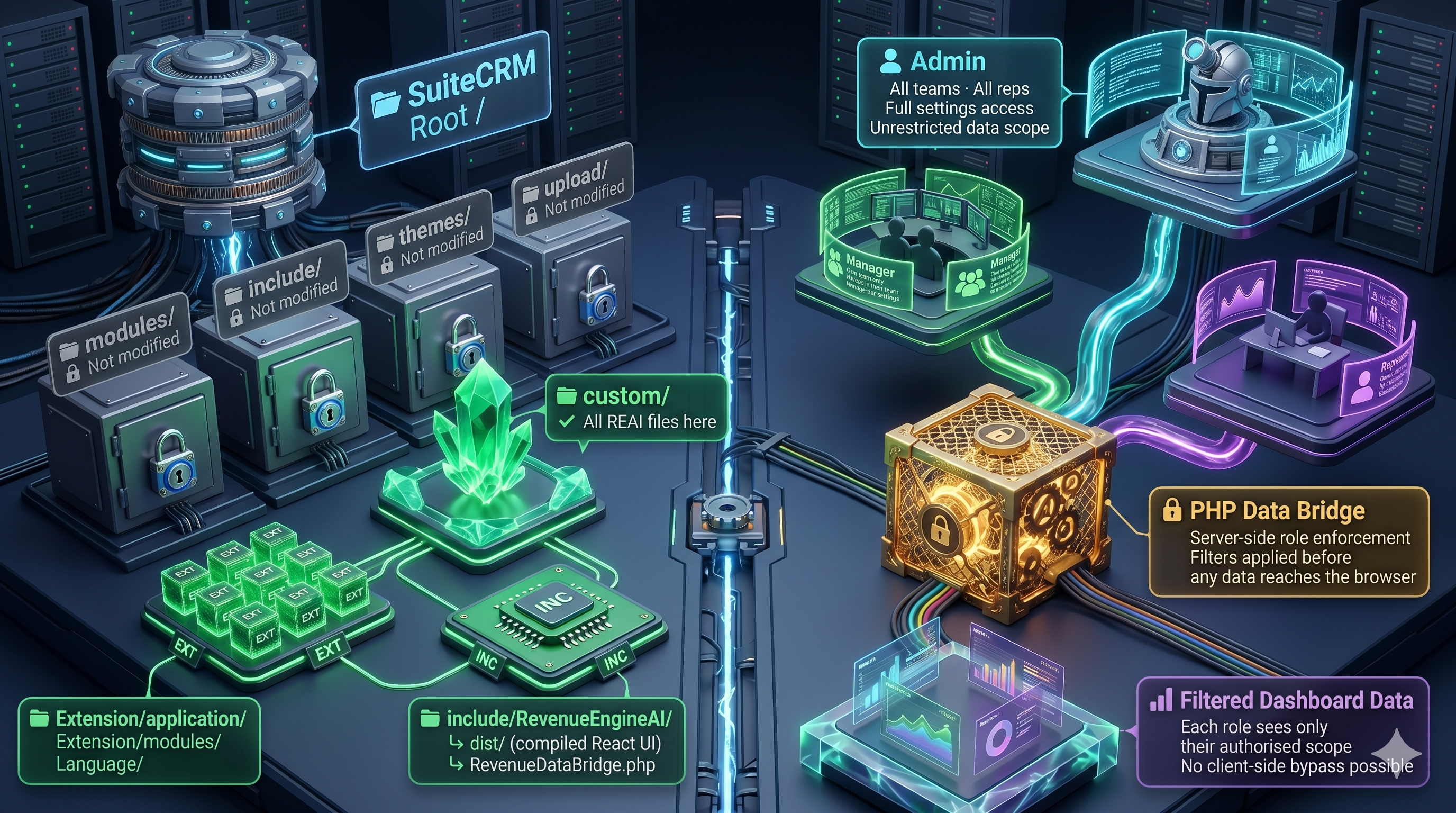
All CRM-side integration uses SuiteCRM’s standard Extension framework — the recommended approach for safe plugin development. No files are written directly to core SuiteCRM directories. The extension’s files live in custom/include/RevenueEngineAI/ and the Extension custom/Extension/ hierarchy.
Secure Role-Based Access: Enforced at the Server, Not the Browser
A common pattern in poorly built CRM dashboards is to fetch all data server-side and then filter it in the browser using JavaScript — meaning a technically capable user could inspect the API response and see data they are not supposed to see.
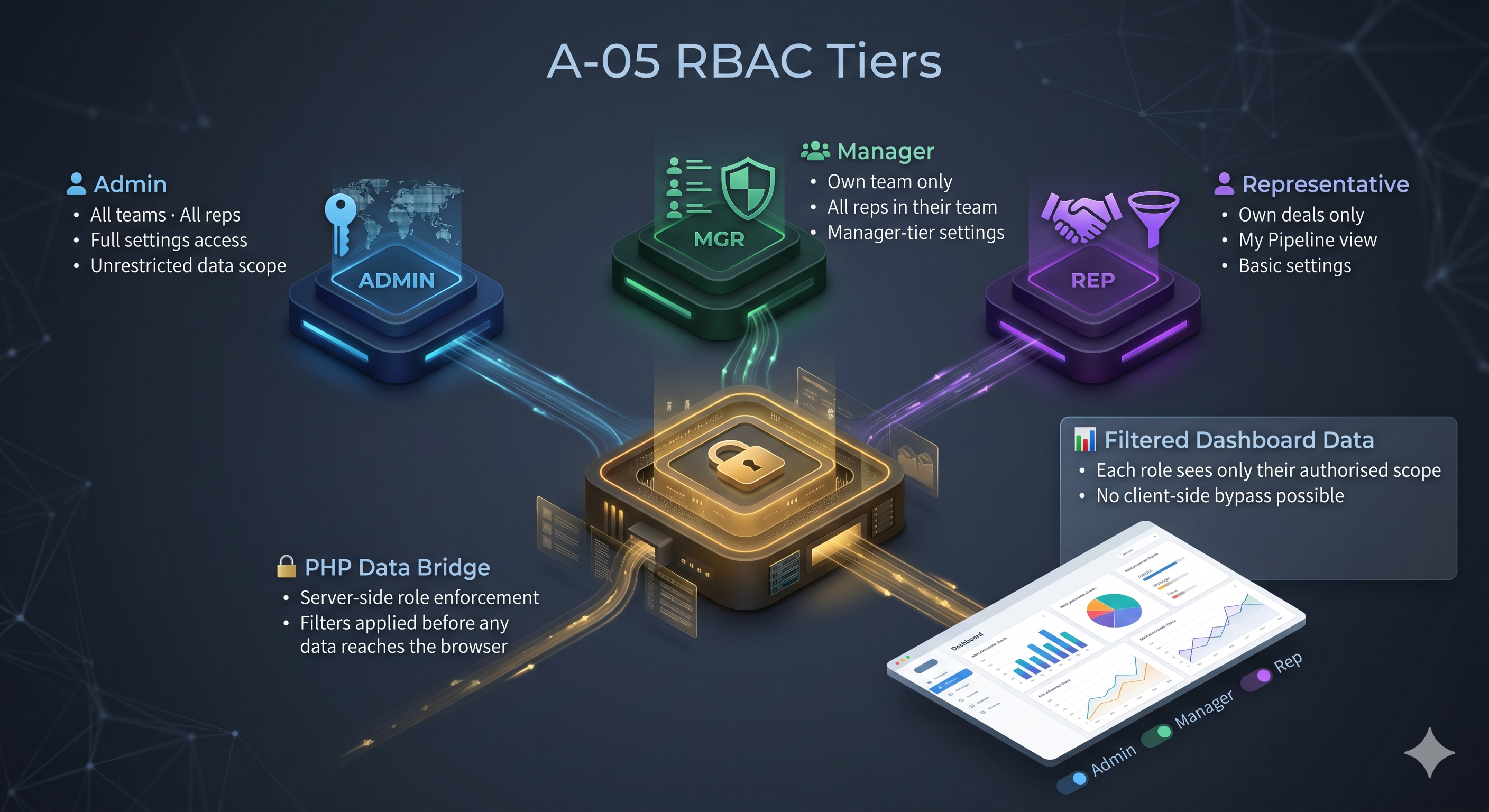
Revenue Engine AI enforces a 3-tier data visibility model at the PHP data bridge level — before any data leaves the server:
- SuiteCRM Admins: Receive full organisational data — all reps across all teams
- Security Group Admins (Managers): Receive only data for users within their assigned SecurityGroups — enforced via
isSecurityGroupAdmin()andgetUserSecurityGroupIds()PHP helper functions - Regular Reps: Receive only their own data — their pipeline, their activities, their performance metrics
A rep cannot manipulate a URL parameter or browser state to receive another user’s data. The PHP layer checks the active SuiteCRM session and applies the appropriate filter before running any database query.
Additional Security Controls
| Control | Implementation |
|---|---|
| Session validation | Every API endpoint returns HTTP 401 if no valid SuiteCRM session is active |
| Admin-only endpoints | License key management and role permissions return HTTP 403 for non-admin users |
| XSS protection | All PHP output uses htmlspecialchars() before rendering |
| CORS hardening | Cross-origin headers restricted to localhost in development; not exposed in production |
| PHP version guard | Pre-install check blocks installation on PHP < 7.4, preventing compatibility issues |
| No hardcoded credentials | AI API keys stored in browser localStorage only; license keys in SuiteCRM config table |
The 5-Minute Installation Walkthrough
Here is exactly what the installation process looks like:
Step 1: Download and Upload
- Download the Revenue Engine AI ZIP package from zybroz.com or the SuiteCRM Marketplace
- Log into SuiteCRM as an Administrator
- Navigate to Admin → Module Loader
- Click Choose File, select the ZIP, click Upload
- Click Install on the package that appears
Step 2: Automatic Quick Repair
The post-install hook runs Quick Repair & Rebuild automatically. You do not need to trigger this manually. The hook also writes compiled Extension file entries directly (as a fallback for shared hosting environments like Hostinger where QR&R can silently fail), ensuring the profile menu link and admin panel entry appear correctly even on non-standard hosting configurations.
Step 3: First Access
After installation, access the dashboard via:
- Profile Menu: Click your username/avatar (top-right) → Revenue Engine AI
- Admin Panel: Admin → Revenue Engine AI section → Open Dashboard
- Direct URL:
https://your-crm.com/index.php?entryPoint=RevenueEngineAI
Step 4: The 6-Step Onboarding Wizard
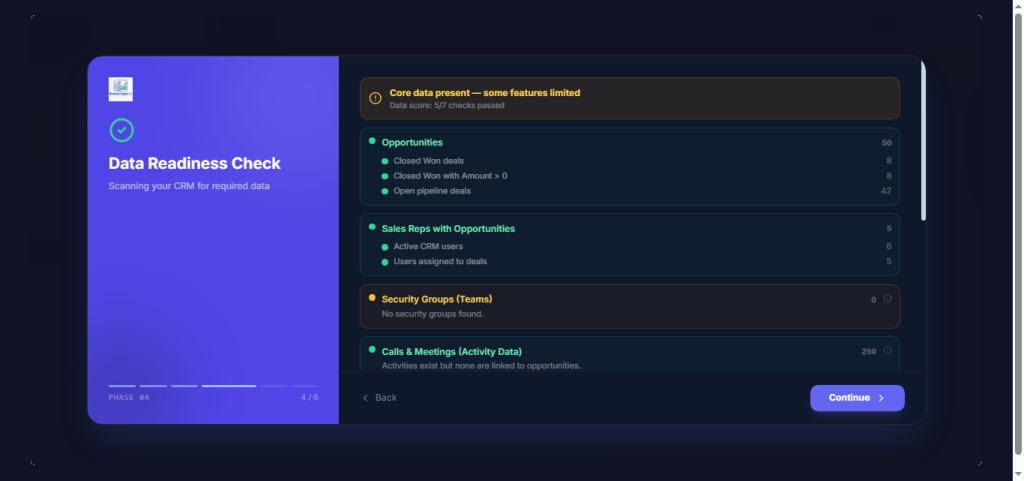
On first access, a guided 6-step wizard walks you through configuration: Welcome → How It Works → Team Setup → Data Readiness Check → AI Key Setup → Ready to Launch. The wizard takes approximately 3 minutes and covers all required configuration. If you skip the wizard or want to reconfigure later, all settings are accessible in the full Settings panel.
Safe Uninstallation — Triple-Layer Cleanup
An extension that installs cleanly but leaves debris on uninstallation is not safe for production use. Revenue Engine AI implements a triple-layer uninstallation process:
- Layer 1 — Blank source files: Extension source files are overwritten with a minimal
<?phpstub before deletion. If the file deletion fails (a known issue on some shared hosting environments), the QR&R that follows will rebuild compiled files from the blank stubs — leaving no REAI content in the compiled output - Layer 2 — Strip compiled file entries: The uninstall hook surgically removes Revenue Engine AI’s marker lines from shared compiled Extension files (
application.php, language files, menu files) without deleting or modifying entries from other extensions - Layer 3 — Quick Repair & Rebuild: A final QR&R rebuilds all compiled files cleanly, ensuring no residual REAI content remains in the running CRM
After uninstallation, the CRM returns to its pre-install state. No schema debris, no orphaned files, no broken compiled files.
Platform Compatibility
| Requirement | Specification |
|---|---|
| SuiteCRM Version | 7.12, 7.14, 7.15 (SuiteCRM 7.x) |
| PHP Version | 7.4 or higher (blocked by pre-install guard on lower versions) |
| Database | MySQL 5.7 or higher |
| Database changes | None (passive-safe) |
| Internet connection required | Only for AI Insights (BYOK) — core dashboard works offline |
Ready to Install?
Revenue Engine AI is available from zybroz.com and the SuiteCRM Marketplace. If you want to see the dashboard before connecting it to your live CRM, the Demo Mode feature provides a fully populated 18-rep enterprise dataset that activates without any CRM data requirements.
For pre-installation questions about compatibility, security architecture, or shared hosting environments, contact us at support@zybroz.com.