

When Salesforce announced Einstein AI, the headlines were exciting. The price was not. Enterprise AI for CRM typically starts at several thousand dollars per year — which puts it firmly out of reach for the SuiteCRM user who chose an open-source CRM specifically to avoid that kind of licensing cost.
Revenue Engine AI takes a different approach. Instead of charging for an AI layer on top of your CRM data, it lets you connect your own AI provider key — Google Gemini, OpenAI, or Anthropic — directly to your dashboard. Your key, your cost, your control. This is what the product calls BYOK: Bring Your Own Key.
Here’s exactly how it works, what it costs, and what you actually get out of it.
First: The Built-In Engine (No Key Required)
Before covering BYOK, it is worth clarifying something important: Revenue Engine AI provides a meaningful level of intelligence without any external AI provider.
The Built-in Intelligence Engine is a rule-based system that runs entirely within the SuiteCRM server environment. It analyses your live CRM data and produces:
- Deal Risk Scores — a 0–100 composite score per deal, based on close date urgency, rep activity staleness, stage/probability optimism gaps, and deal size exposure
- Pipeline Signals — named operational alerts (COVERAGE_CRITICAL, STAGE_CONCENTRATION, STALL_WARNING, ZERO_PIPELINE_REPS, and more) that appear in the Revenue Command Center
- Rep Coaching Flags — automated identification of reps with stalled deals, low conversion rates, or inactivity gaps
- Executive Narrative — a plain-English summary of pipeline health generated from the signals above, with no LLM required
This runs on every dashboard load, automatically, at zero cost. The BYOK AI layer adds a richer, more conversational layer on top of this existing intelligence — it does not replace it.
What Is BYOK and Why Does It Matter for Data Privacy?
The “Bring Your Own Key” model means that you provide an API key from an AI provider, and Revenue Engine AI uses that key to generate richer coaching summaries. What it does not do is send your CRM data to Zockra servers.
Here is the exact data flow when you click Generate Insights:
- The PHP data bridge extracts aggregated KPI data and deal signals from your SuiteCRM database — not raw opportunity records, but summarised intelligence (rep names, deal counts, revenue figures, signal flags)
- Your browser constructs a structured prompt from this data
- The request goes directly from your browser to your chosen AI provider (Google, OpenAI, or Anthropic) using your API key
- The AI response is rendered in your dashboard — it never passes through Zockra infrastructure
Your API keys are stored in your browser’s localStorage only. They are never transmitted to or stored on Zockra servers. This is a design constraint, not just a policy.
Setting Up Google Gemini (Free — 3 Steps)
Google Gemini is the recommended starting point for most teams because it offers a generous free quota under the AI Studio free tier — enough for daily use in a typical sales team without any monthly cost.
Revenue Engine AI uses the Gemini 2.5 Flash model, which provides fast, accurate analysis of structured sales data.
Step 1: Get Your API Key
- Go to aistudio.google.com
- Sign in with a Google account (personal or work Gmail)
- Click Get API Key → Create API Key
- Copy the generated key — it will start with
AIza...
Step 2: Paste into Revenue Engine AI
- Open the Revenue Engine AI dashboard
- Click the gear icon to open Settings
- Open the AI Configuration — BYOK accordion
- Paste your key into the Your AI API Key field
- The system will display a Google Gemini badge to confirm the provider was detected from the key prefix
- Click Save Changes
Step 3: Generate Your First Brief
Navigate to the Revenue Command Center. Click the Generate Insights button. Within 10 seconds, you will have a structured AI-generated brief covering your current pipeline health.
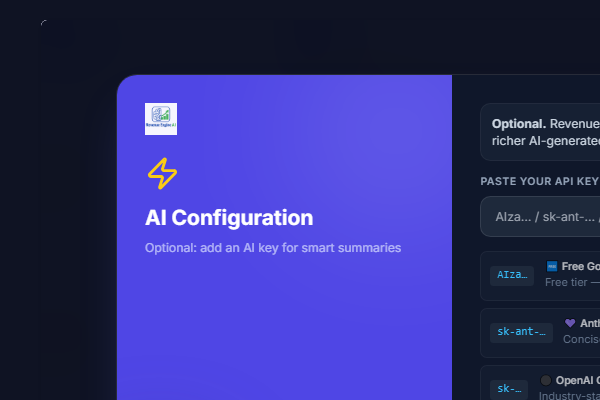
The Single Smart Key — Provider Auto-Detection
One detail worth highlighting: Revenue Engine AI uses a single key input field for all three AI providers. You do not need to configure separate fields for each provider.
The system auto-detects your provider from the key prefix:
- Starts with
AIza...→ Detected as Google Gemini 2.5 Flash - Starts with
sk-ant-...→ Detected as Anthropic Claude Haiku - Starts with
sk-...→ Detected as OpenAI GPT-4o Mini
You can also configure multiple keys (one per provider). When the primary provider hits its usage quota and returns an error, the system automatically retries with the next configured provider:
Gemini → OpenAI → Anthropic
This means your Monday morning pipeline review is never blocked by a single provider hitting rate limits overnight.
What the AI Brief Actually Contains
When you generate an AI brief, the output is structured — not a wall of text. A typical brief covers:
- Pipeline Health Summary: Overall forecast status, coverage ratio vs target, and key risk signals in plain English
- Top Performers: Named reps with the highest revenue attainment or conversion rates this period
- At-Risk Reps: Named reps with the most stalled deals, with context (e.g., “Priya Sharma has 3 deals stalled for 18+ days with no logged activity”)
- Low Conversion Alert: Reps with conversion rates significantly below the team average, with a suggested coaching focus
- 3 Recommended Actions: Specific, data-driven priorities for the week ahead — based on your actual pipeline state, not generic advice
The brief is generated from the current state of your CRM data at the time of generation. Click Generate again at any point to get an updated brief reflecting changes made since the last run.
Role-Based AI Scoping
Even with a personal Gemini key configured, a sales rep cannot use AI Insights to access data beyond their own pipeline. The PHP data bridge enforces role-based visibility before constructing the AI prompt:
- Admins → AI brief covers the entire organisation
- Managers → AI brief covers only their assigned security group or team
- Reps → AI brief covers only their own pipeline and deals
A rep cannot construct a prompt that includes other reps’ data — the server-side filter is applied before the prompt is built.
What This Costs
The Gemini free tier under Google AI Studio provides enough quota for daily dashboard use for a small to medium team with no monthly charge. If you exceed the free quota (which generates a 429 error), it resets the following day — or you can upgrade to a paid Gemini tier for higher limits.
OpenAI and Anthropic are paid-from-the-start providers, but GPT-4o Mini and Claude Haiku are among the most cost-efficient models available. For the structured, data-driven prompts that Revenue Engine AI sends, typical usage costs a few pence or cents per generation — well under £1/$1 per day for a team using it actively.
Get Started Today
Revenue Engine AI is available on the SuiteCRM Marketplace and at zybroz.com. Compatible with SuiteCRM 7.12, 7.14, and 7.15. A Google AI Studio account is free to create and takes less than 2 minutes to set up.
If your sales team is running on SuiteCRM and you want executive-grade AI sales coaching without an enterprise AI contract, BYOK is the fastest route there.
Questions about setup or data privacy? Email us at support@zybroz.com.