
Every sales team has fake pipeline. Deals that are still marked “Negotiation” or “Proposal Sent” in the CRM, but haven’t had a real conversation in six weeks. The prospect has moved on. The rep knows it but hasn’t updated the record. The manager sees a healthy-looking pipeline report and plans headcount accordingly. This is pipeline rot – and the deal hygiene monitor SuiteCRM tool in TeamPulse is built to surface it before it distorts your forecasts.
Pipeline rot doesn’t announce itself. It accumulates quietly in the gaps between 1:1 reviews, inside CRM records that technically exist but represent no real opportunity. By the time it shows up as a missed quarter, you’ve already lost the chance to intervene.
The 4 Red Flags TeamPulse Scans For
TeamPulse evaluates every open Opportunity in SuiteCRM against four hygiene criteria. A deal that fails any one of these is flagged in the Deal Hygiene Monitor.
1. No Next Step
An open deal with zero future tasks, calls, or meetings attached to it. If there is no scheduled next action, there is no deal – there is only a record. This is the most common and most damaging hygiene failure because it’s invisible in standard pipeline views. The deal amount still adds to forecast. The stage still looks active. But without a next step, nothing is moving it forward.
2. Stalled in Stage
A deal that has remained in the same pipeline stage for more than 30 days. This threshold is configurable in TeamPulse Settings. Stage progression is the clearest measurable signal of deal momentum – a deal that doesn’t move stages for a month is almost always either dead or severely delayed.
Note the distinction between “stalled” and “stale” – these are two different thresholds that serve different purposes. More on that below.
3. Expired Close Date
A deal whose expected close date has already passed with no update to the record. Every expired close date is either a deal that was lost and not recorded, or a deal that slipped and wasn’t rescheduled. Both represent a failure of pipeline data integrity. Either way, that revenue is not coming in when the forecast model says it will.
4. Missing Data
A deal with a null or $0 amount, or no activity logged in the last 7 to 14 days. A deal with no dollar value attached cannot be forecast. A deal with no recent activity is a deal no one is actively working. Missing Data flags catch records that are incomplete at a basic level – opportunities that were created but never properly qualified.
Stale vs. Stalled – Two Thresholds, Two Purposes
TeamPulse uses two different inactivity thresholds, and it’s worth being precise about what each one means.
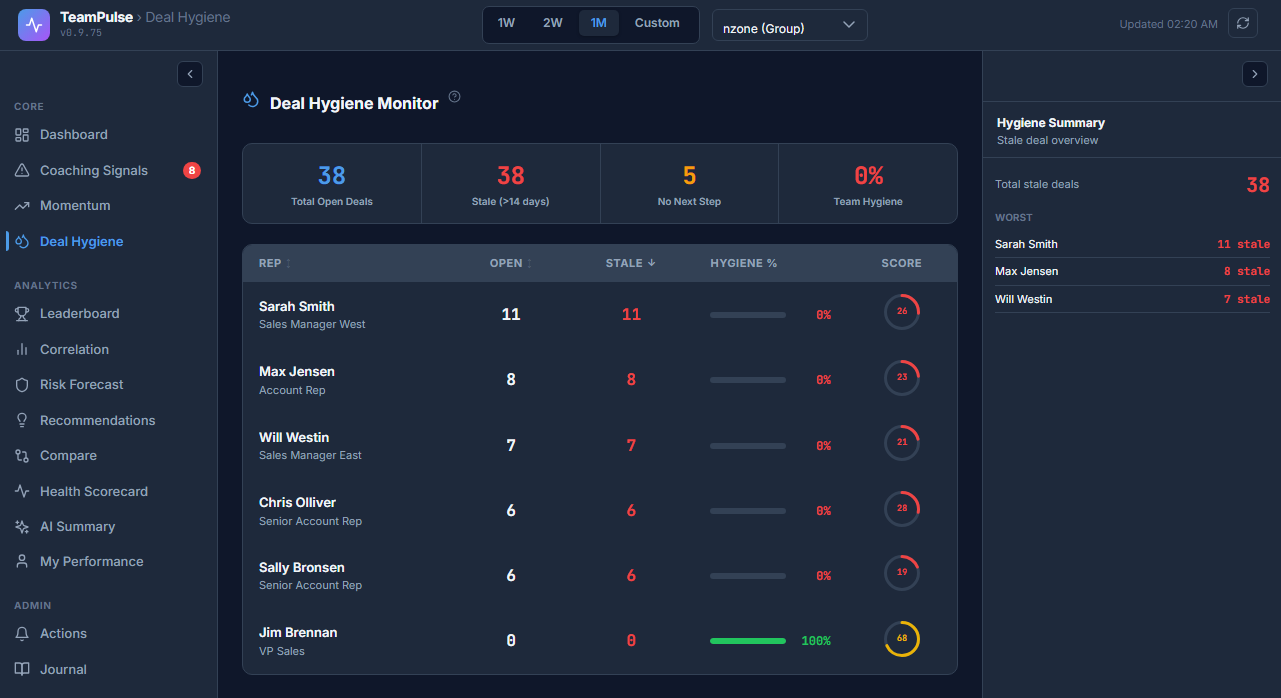
Stale (14 days, no-touch): The summary bar at the top of the Deal Hygiene Monitor shows a “Stale” count – deals that have had no activity of any kind in the last 14 days. This is your early warning line. A deal going 14 days without a call, email log, task, or note is showing the first signs of neglect.
Stalled in Stage (30 days): The Stalled in Stage flag triggers when a deal has not advanced to a new pipeline stage in 30 days. This is a harder signal – a deal can have some activity (a follow-up email here, a note there) and still be stalled in stage if no real progress is happening.
These are not redundant. A deal can be Stale without being Stalled in Stage (if it was recently moved to a new stage but has since gone quiet). A deal can be Stalled in Stage without being Stale (if the rep is logging activity but not advancing the deal). Both patterns are meaningful – they just indicate different problems.
How Deal Hygiene Affects the Discipline Score
Deal Hygiene carries 20% weight in the overall Discipline Score. This means poor hygiene has a direct, quantified impact on how a rep’s process adherence scores across the team.
The practical cap is around 80 out of 100. A rep who is highly active – great follow-up speed, strong task completion, daily CRM updates – but whose open deals are full of hygiene flags cannot score above roughly 80. The hygiene dimension holds them back because pipeline quality is factored into process adherence, not just activity volume.
This prevents a common problem in activity-based sales management: rewarding reps for logging lots of calls while their actual pipeline is in poor shape. Volume and hygiene are both tracked, and both matter.
Reading the 4-Column Summary Bar
The top of the Deal Hygiene Monitor shows a summary bar with four columns. These give you the team-level picture before you drill into individual deals.
| Column | What It Shows |
|---|---|
| Total Open | Total number of open Opportunities in the current team or rep view |
| Stale | Deals with no activity in the last 14 days – your early warning count |
| No Next Step | Deals with zero future tasks, calls, or meetings scheduled |
| Team Hygiene % | Percentage of open deals that pass all four hygiene checks – the overall pipeline health score |
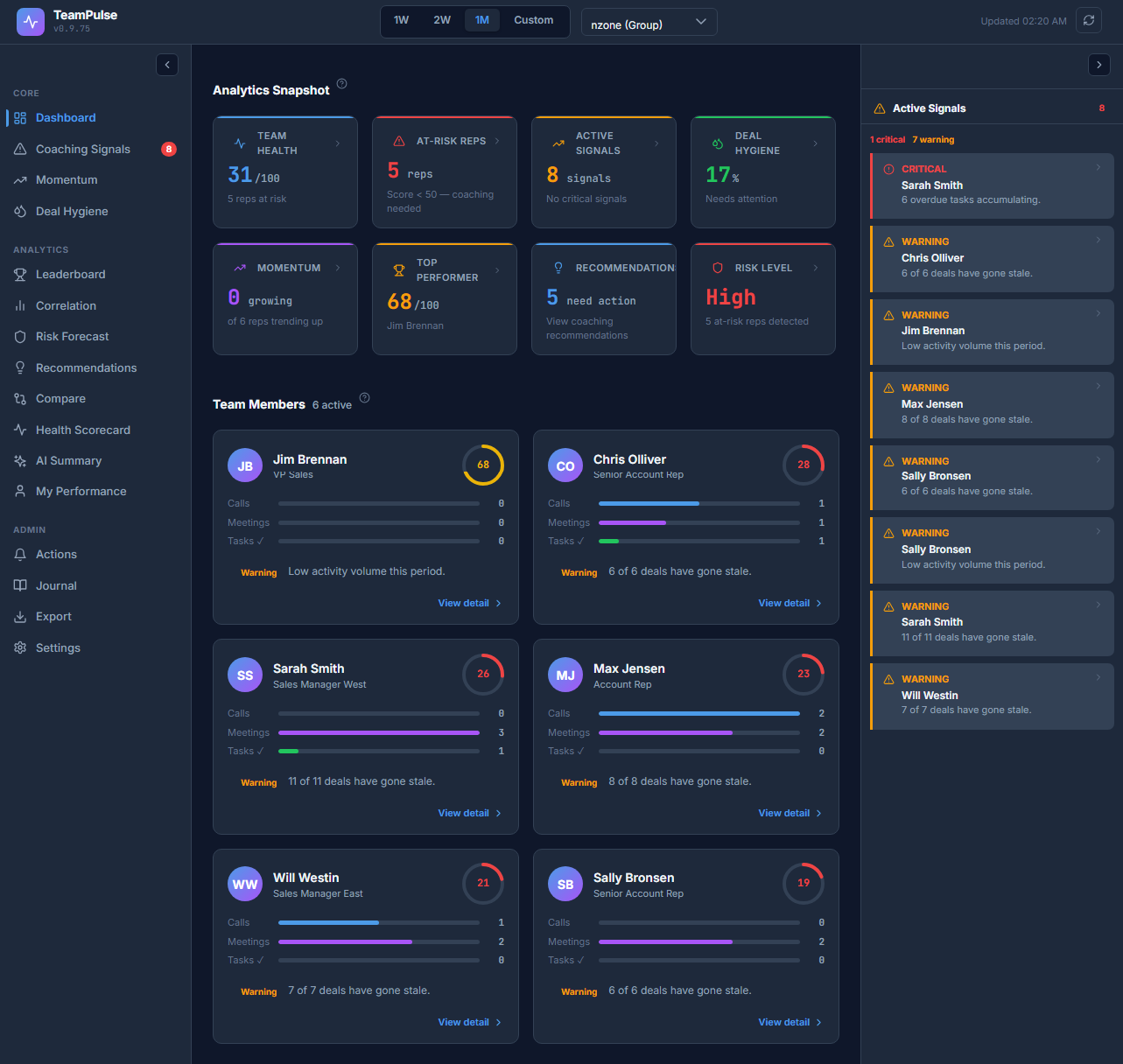
A healthy team typically runs a Team Hygiene % above 75. Below 60 indicates systemic pipeline management problems – not a single rep’s issue but a team-wide process failure that needs a structural fix, not individual coaching.
Using the Monitor in 1:1 Reviews
The Deal Hygiene Monitor is most effective when it drives a specific practice in your weekly 1:1s: the pipeline purge.
Pull up the rep’s hygiene view before the meeting. For every flagged deal – especially the “No Next Step” flags – ask one question: What is the next concrete action, and when does it happen?
If the rep cannot name a specific next step with a specific date, that deal should be closed as Lost. Not moved to a later close date. Not left open with a vague note. Closed, so it stops distorting forecast and stops taking up mental space.
This practice sounds harsh, but it has two benefits. First, it forces honest pipeline assessment – reps stop carrying deals they know are dead because they know it will come up in the review. Second, it cleans the forecast data so that what remains in the pipeline is actually real.
Reps who know the hygiene monitor exists and that managers can see it tend to maintain cleaner pipelines proactively, without being prompted.
Action Buttons in the Monitor
For each flagged deal in the Deal Hygiene Monitor, TeamPulse provides inline action options:
- Add Task: Create a new task directly from the hygiene view, with the deal pre-linked. This removes the friction of navigating to the Opportunity record to add a next step.
- Mark Reviewed: Log that the deal was reviewed in the current session. This is useful for deals that are legitimately on hold (waiting for a contract review, a budget cycle, etc.) – it shows the deal has been acknowledged rather than forgotten.
- Coaching Note / Alert: Add a coaching note to the deal or flag it for follow-up in a rep’s coaching record. This ties the hygiene issue to the coaching workflow rather than treating it as a one-off admin fix.
Configuring Hygiene Thresholds
The 30-day Stalled in Stage threshold is the primary configurable parameter. You can adjust it in Settings ? Scoring Rules to match your typical sales cycle length. A team with a 90-day average sales cycle might move the stalled threshold to 45 days; a team with a 30-day cycle might tighten it to 14.
Note: full configurable weight sliders for all five Discipline Score factors – including Deal Hygiene’s 20% share – are planned for the v1.0 release. In v0.9.9, the weights are fixed at their default values.
FAQ: What Counts as Activity to Clear a Stale Deal?
Q: My rep says they’ve been working the deal – why is it still showing as Stale?
A: The Stale flag clears when a logged activity is recorded against the Opportunity record in SuiteCRM. The following activity types count:
- A logged Call (inbound or outbound) linked to the Opportunity
- A Meeting linked to the Opportunity
- A Task update or completion on a task linked to the Opportunity
- A Note added to the Opportunity record
Activity that happens outside SuiteCRM – an email in a personal inbox, a phone call not logged, a conversation mentioned verbally in a 1:1 – does not clear the flag. The hygiene monitor can only read what’s in the CRM. This is by design: if it isn’t logged, it isn’t tracked, and it can’t contribute to forecast or coaching analysis.
Q: A deal has activity but is still showing Stalled in Stage. Why?
A: Stalled in Stage tracks stage progression, not activity volume. A rep can log calls every week against a deal that has been sitting in “Proposal Sent” for 45 days – the deal is still stalled in stage because no stage change has been recorded. Activity without progression is a signal worth examining: what is blocking the deal from advancing?
Q: Can I filter the monitor by rep or team?
A: Yes. The Deal Hygiene Monitor responds to the same team and rep filters as the rest of the TeamPulse dashboard. You can scope it to a specific rep for a 1:1 review, or to an entire team for a weekly pipeline meeting.
Next Step: Connect Hygiene to Coaching Signals
The Deal Hygiene Monitor identifies the problem. The Coaching Signals engine in TeamPulse converts it into a prioritized coaching action. A rep whose Deal Hygiene sub-score drops below the at-risk threshold automatically surfaces in the Coaching Signals queue – so you don’t have to remember to check the hygiene monitor manually before every 1:1.
Read the full Coaching Signals guide to see how hygiene flags, momentum drops, and score trends combine into a prioritized coaching workflow.
Install TeamPulse on SuiteCRM and run your first pipeline hygiene audit in under five minutes.