
Revenue is a lagging indicator. By the time a missed quota shows up on your sales report, the behavioral breakdown that caused it happened three to six weeks earlier. A rep stopped logging follow-ups on time. Their open deals sat untouched. Their activity cadence developed gaps. The damage was already done – the report just hadn’t caught up yet. The sales discipline score SuiteCRM extension TeamPulse is built to surface these signals before they become misses.
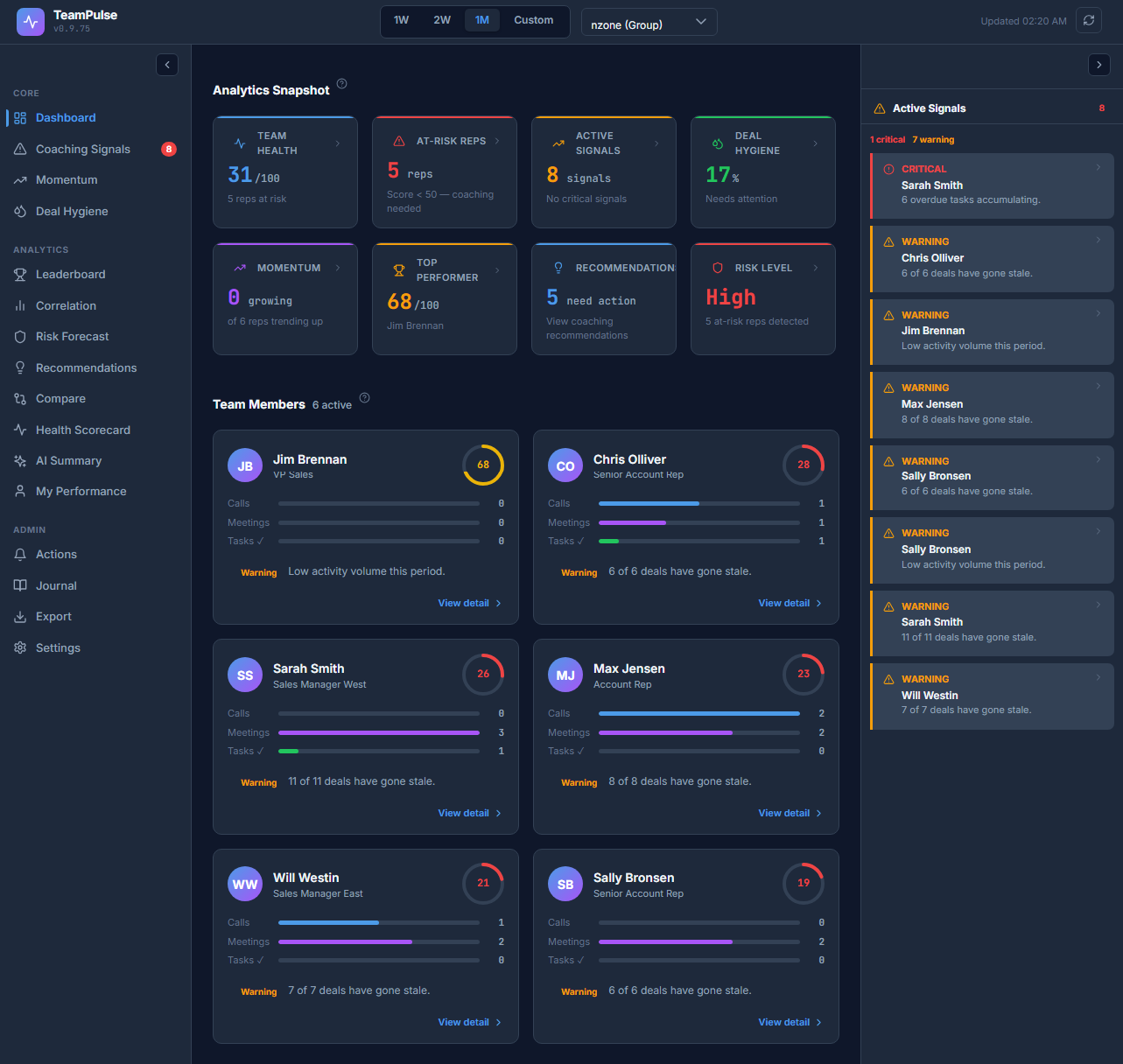
TeamPulse calculates a Discipline Score – a 0 to 100 behavioral metric – for every sales rep in your SuiteCRM instance. It does not measure revenue, quota attainment, or win rate. It measures process adherence: how consistently a rep follows the behaviors that create pipeline health over time.
What the Discipline Score Actually Measures
The score runs from 0 to 100 and is a weighted average of five behavioral factors pulled directly from SuiteCRM activity data. It updates on a rolling basis – a rep’s score reflects their recent behavior, not a snapshot frozen at month-end.
Score bands give you an immediate read on each rep:
- 90-100 – Exceptional: Process discipline is strong across all five factors. This rep’s pipeline is clean and their activity cadence is consistent.
- 70-89 – Standard / Strong: Solid performance. Minor gaps in one or two factors, but pipeline risk is low.
- 50-69 – Needs Coaching: Meaningful process gaps. This rep needs a targeted coaching conversation on their weakest factor.
- 0-49 – Critical: At-risk. Multiple factor breakdowns. Quota miss risk is high without immediate intervention.
Color coding makes this visible at a glance on the Dashboard: green at 75 and above, amber for 50-74, red below 50. The at-risk threshold is 49 – any rep at or below that number triggers priority review.
Factor 1 – Follow-up Consistency (25% Weight)
Follow-up Consistency is the highest-weighted factor in the score. It measures two things: how quickly a rep responds to new leads and deals, and whether activities are logged after key interactions such as meetings or calls.
A low sub-score here tells you one of two things. Either the rep is slow to engage new opportunities – letting leads go cold before first contact – or they’re having conversations that never make it into the CRM. Both patterns create the same downstream problem: a pipeline that looks healthy but isn’t.
This factor has 25% weight because speed and documentation of follow-up are the single strongest predictor of whether a deal progresses or stalls early in the funnel.
Factor 2 – Task Completion (20% Weight)
Task Completion measures the ratio of on-time completed tasks to overdue tasks. A rep who consistently closes tasks on or before their due date scores well here. A rep who repeatedly lets tasks lapse or marks them complete days after the deadline scores poorly.
Overdue tasks are not just an admin nuisance – they signal commitments to prospects and customers that weren’t honored. A low Task Completion sub-score often correlates with reps who over-commit in meetings and underdeliver on follow-through.
Factor 3 – CRM Update Frequency (15% Weight)
CRM Update Frequency tracks recency of logins and record modifications. It answers a straightforward question: is this rep actively maintaining their data, or are they logging in once a week to do a bulk update?
At 15% weight, this is the lowest-weighted factor because data entry discipline alone doesn’t close deals. But a rep who rarely updates their CRM records is almost certainly also missing follow-ups and letting deals stagnate. It functions as an early warning signal rather than a primary driver.
Factor 4 – Deal Hygiene (20% Weight)
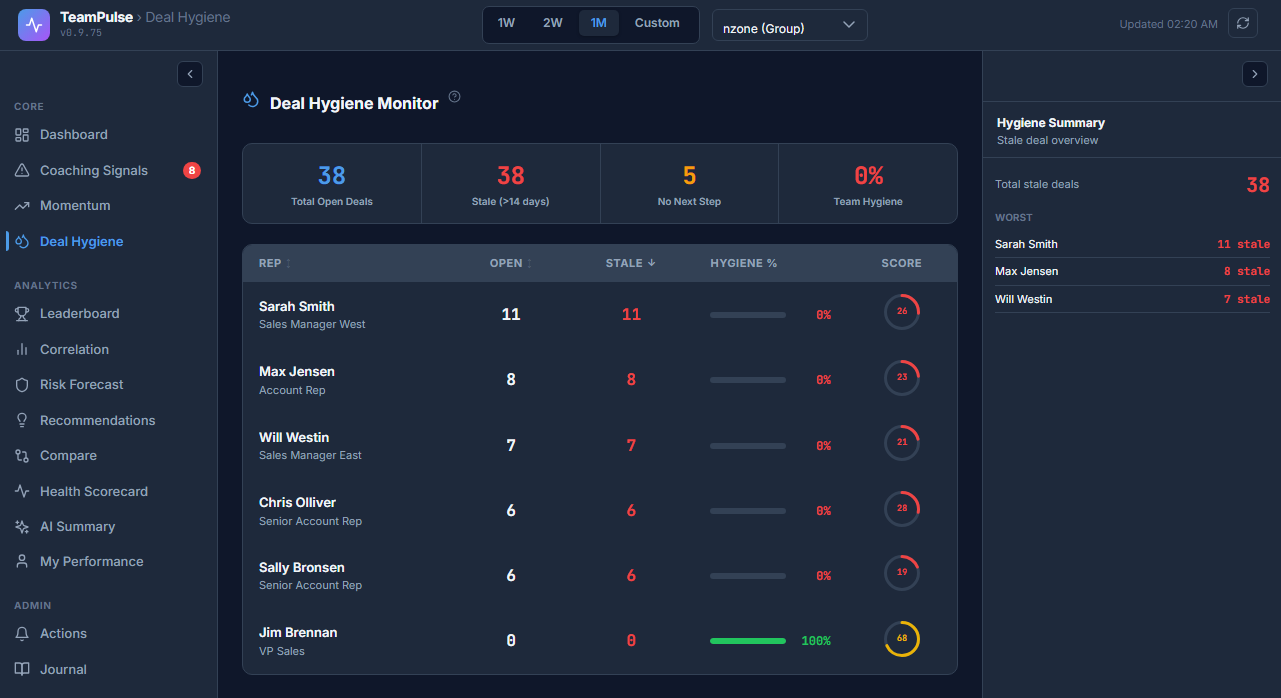
Deal Hygiene measures the percentage of open deals that have a real next step, a valid close date, and a non-stagnant stage. TeamPulse flags four specific red flags in each rep’s pipeline:
- No Next Step: An open deal with zero future tasks, calls, or meetings attached.
- Stalled in Stage: A deal that has sat in the same pipeline stage for more than 30 days (configurable).
- Expired Close Date: A deal whose close date has already passed with no update.
- Missing Data: A deal with a null or $0 amount, or no activity in the last 7 to 14 days.
The practical implication of the 20% weight is this: a rep can have high activity volume and strong task completion, but if their open deals are full of hygiene flags, their Discipline Score is capped. High activity with poor hygiene typically produces a score around 80/100 – solid but not Exceptional – because the pipeline health dimension is compromised.
Factor 5 – Activity Continuity (20% Weight)
Activity Continuity measures daily cadence – specifically, whether a rep has gaps of multiple consecutive days with no CRM activity. A rep who logs calls, tasks, and meetings every working day scores well. A rep who works in bursts – highly active for a few days, then silent for three or four – scores poorly even if their total weekly volume is the same.
Continuity matters because deals die in the gaps. Prospects lose momentum. Referrals go cold. The cadence of daily activity is what keeps pipeline moving; burst patterns are a structural risk regardless of total output.
The Daily Decay Mechanic
TeamPulse includes a decay component to prevent scores from inflating on stale data. If a rep logs no new activity, their score does not hold steady at its last value – it begins to decay. This means a rep cannot run hot for two weeks, go quiet for a week, and still show a strong score.
Decay prevents “ghost scores” – reps who look fine on the leaderboard but haven’t touched their CRM in days. Managers can trust that a high score reflects current behavior, not historical momentum.
How to Use the Score in Practice
The workflow for daily coaching use is straightforward:
- Open the Dashboard in TeamPulse. Each rep appears as a score tile with their current Discipline Score and color status.
- Click any rep tile to open the Member Drill view. This shows the full 5-factor breakdown as sub-score rings – one ring per factor – so you can see exactly which dimension is pulling the overall score down.
- The weakest factor ring is your coaching priority. If Deal Hygiene is 40 but all other factors are 75+, the conversation should be about pipeline discipline, not activity volume.
Benchmarking with the Compare View
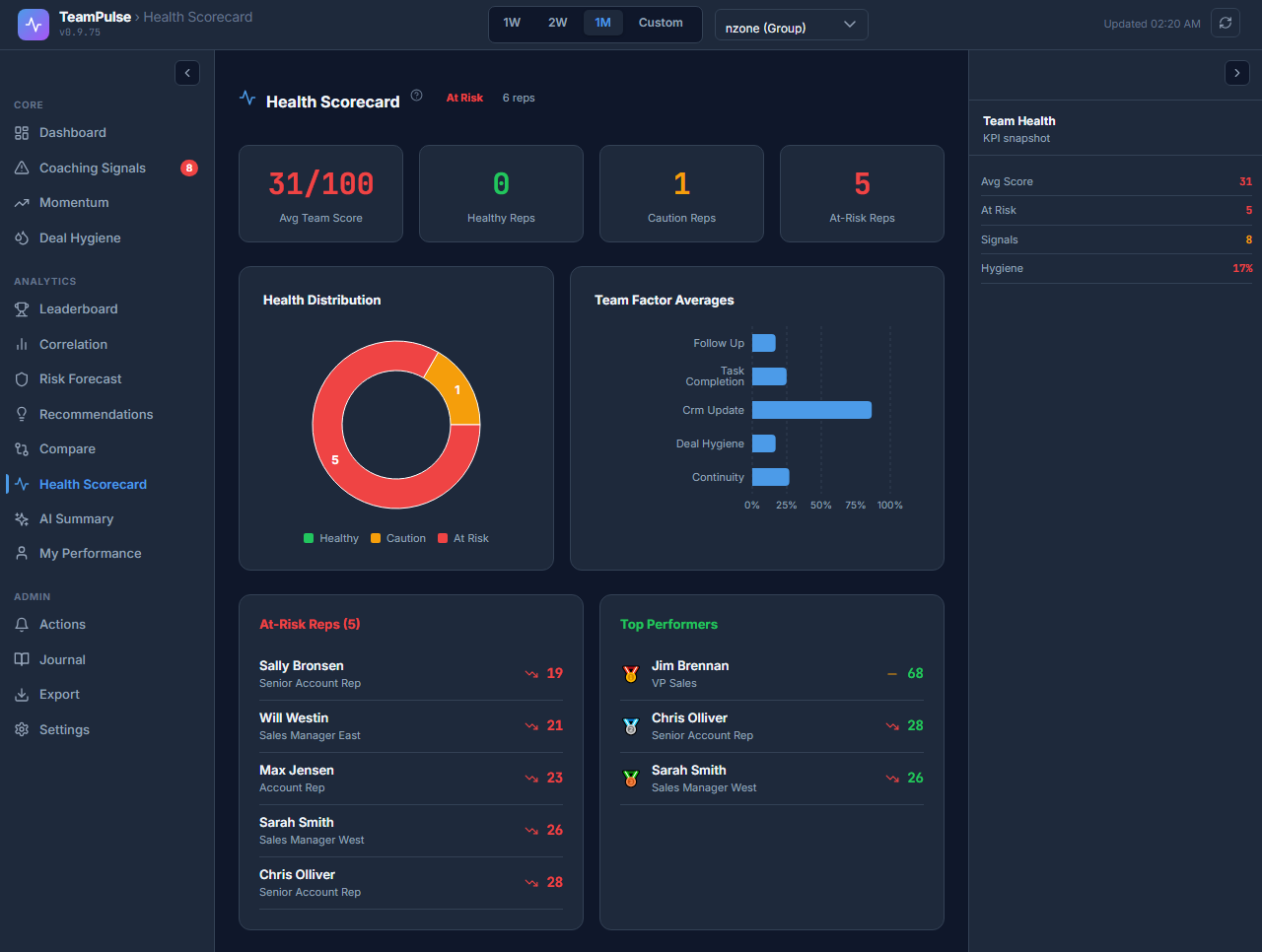
TeamPulse includes a Compare view that lets you place two or more reps side by side on their 5-factor sub-scores. This is most useful for identifying the gap between a top performer and a rep who is struggling.
A common pattern: the top rep and the struggling rep have similar Deal Hygiene scores, but the gap is entirely in Follow-up Consistency and Activity Continuity. That tells you the struggling rep has the right pipeline practices but isn’t maintaining daily cadence or responding to leads fast enough. The coaching conversation is completely different than if the gap were in Task Completion.
Without factor-level visibility, managers default to “you need to do more” – a feedback direction that doesn’t address the actual behavioral driver. The Compare view replaces that with specificity.
FAQ: My Rep Closed a Big Deal – Why Is Their Score Low?
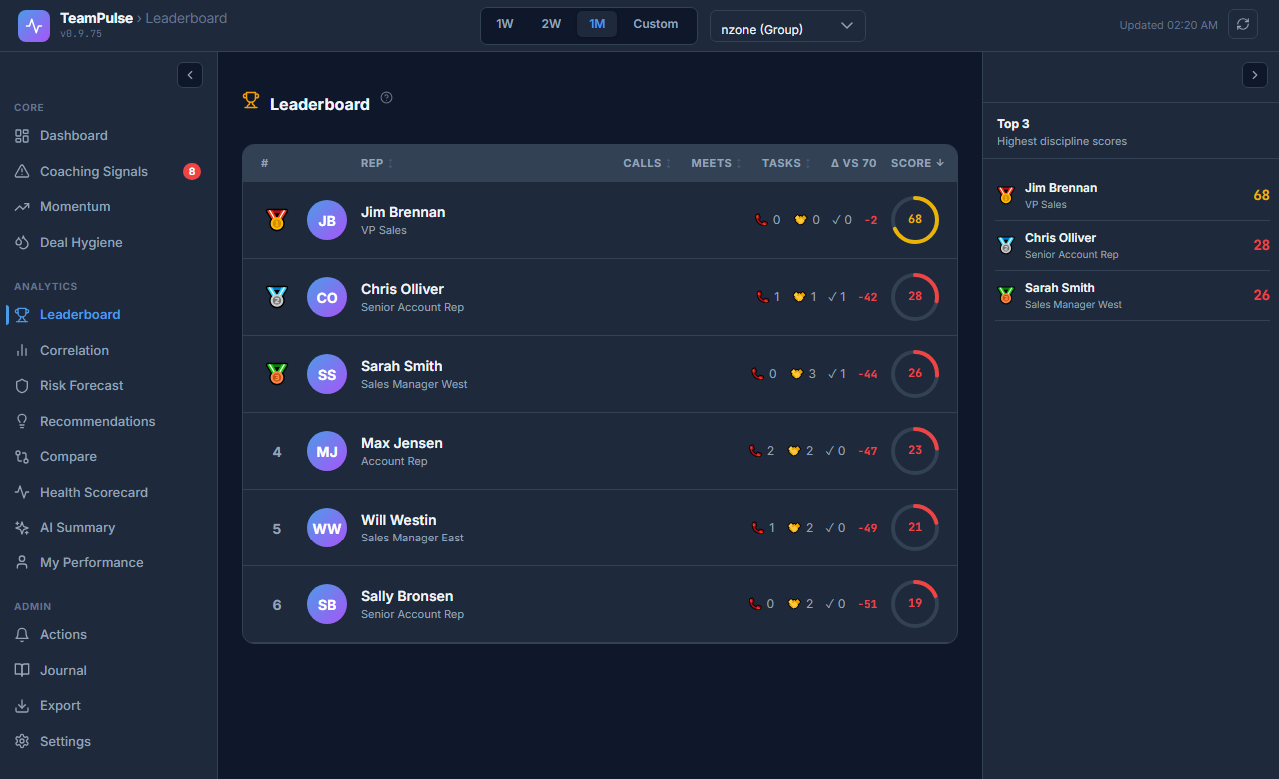
Q: One of my reps just closed a six-figure deal. Their Discipline Score is 61. That seems wrong.
A: The Discipline Score is not a revenue metric. It measures process consistency over the scoring window – not outcomes in a given month. A rep can close a large deal on the strength of a relationship or an inbound referral without demonstrating the consistent daily behaviors that the score tracks.
A score of 61 alongside a closed deal tells you: this rep can win, but their pipeline practices are inconsistent. The process breakdown visible in the score is a leading indicator of what happens to the next ten deals in their funnel – most of which won’t benefit from the same relationship leverage.
Revenue results and Discipline Scores can and do diverge in the short term. Over a rolling quarter, they tend to converge – because process adherence is what generates repeatable results.
Q: Can I adjust the factor weights?
A: In v0.9.9, scoring weights are read-only. Configurable weight sliders are planned for v1.0. The default weights – Follow-up Consistency 25%, Task Completion 20%, Deal Hygiene 20%, Activity Continuity 20%, CRM Update Frequency 15% – reflect the standard model for SuiteCRM-based sales teams.
Q: What date range does the score cover?
A: TeamPulse supports 1-week, 2-week, and 1-month date filters, plus a custom range. You can shift the scoring window to match your review cadence – weekly 1:1s typically use the 1W or 2W view; monthly pipeline reviews use the 1M view.
Start Reading Behavior, Not Just Results
Revenue reports tell you what happened. The Discipline Score tells you what’s happening – right now, in the daily behaviors of every rep on your team. Install TeamPulse on your SuiteCRM instance and get the 5-factor breakdown for your entire team within minutes of setup.
Get TeamPulse on the SuiteCRM Store – or follow the installation guide to deploy on your existing SuiteCRM instance.