v0.0.9 · Android · Free Download

AWS Console Manager

Manage your AWS infrastructure from your Android phone. Start and stop EC2 instances, track monthly spend, find wasted resources, and get CloudWatch alerts in real time — without opening a laptop. No AWS access keys stored on device.

Free to download · No AWS keys stored on device · 7-day Pro trial included

8+
AWS Services Managed
<10 min
Setup via CloudFormation
Zero
AWS Keys Stored on Device
7-day
Free Pro Trial Included
My Cloud Pilot — app screenshot

Why DevOps Engineers Need an AWS Console App Alternative

The official AWS mobile app gives you visibility. It does not give you control. You cannot start an EC2 instance, check your IAM security score, or identify wasted spend all in one place, in under three taps.

AWS Console Manager fills every gap the official app leaves open: zero-key security, multi-account support, and FinOps waste detection built for engineers who manage AWS without a 24/7 NOC team.

  • EC2 start/stop — official app has no write actions
  • AWS Cost Waste Finder — orphaned EBS, idle EIPs, old snapshots
  • IAM Security Audit — 0–100 score, MFA check, key age alerts
  • Multi-account switching — unlimited accounts (Pro)
  • CloudWatch push alerts — billing spikes + alarm state changes
  • Auto Scaling Group control — adjust capacity from phone
  • Setup in under 10 minutes via CloudFormation
  • Zero-Key Architecture — AWS keys never touch your device

EC2 Monitor, Cost Optimizer & Security Auditor — In One App

Start, Stop & Monitor EC2 From Your Phone

Live CPU utilization graphs via CloudWatch with 60-second polling. Start or stop instances with a 2-step safety confirmation. Filter by state: running, stopped, terminated. Free: 1 action per session. Pro: unlimited, across all accounts and regions.

  • Start / Stop / Reboot instances
  • Live CPU + Network + I/O graphs
  • Filter by state: running / stopped
  • Pro: instance type change, security groups
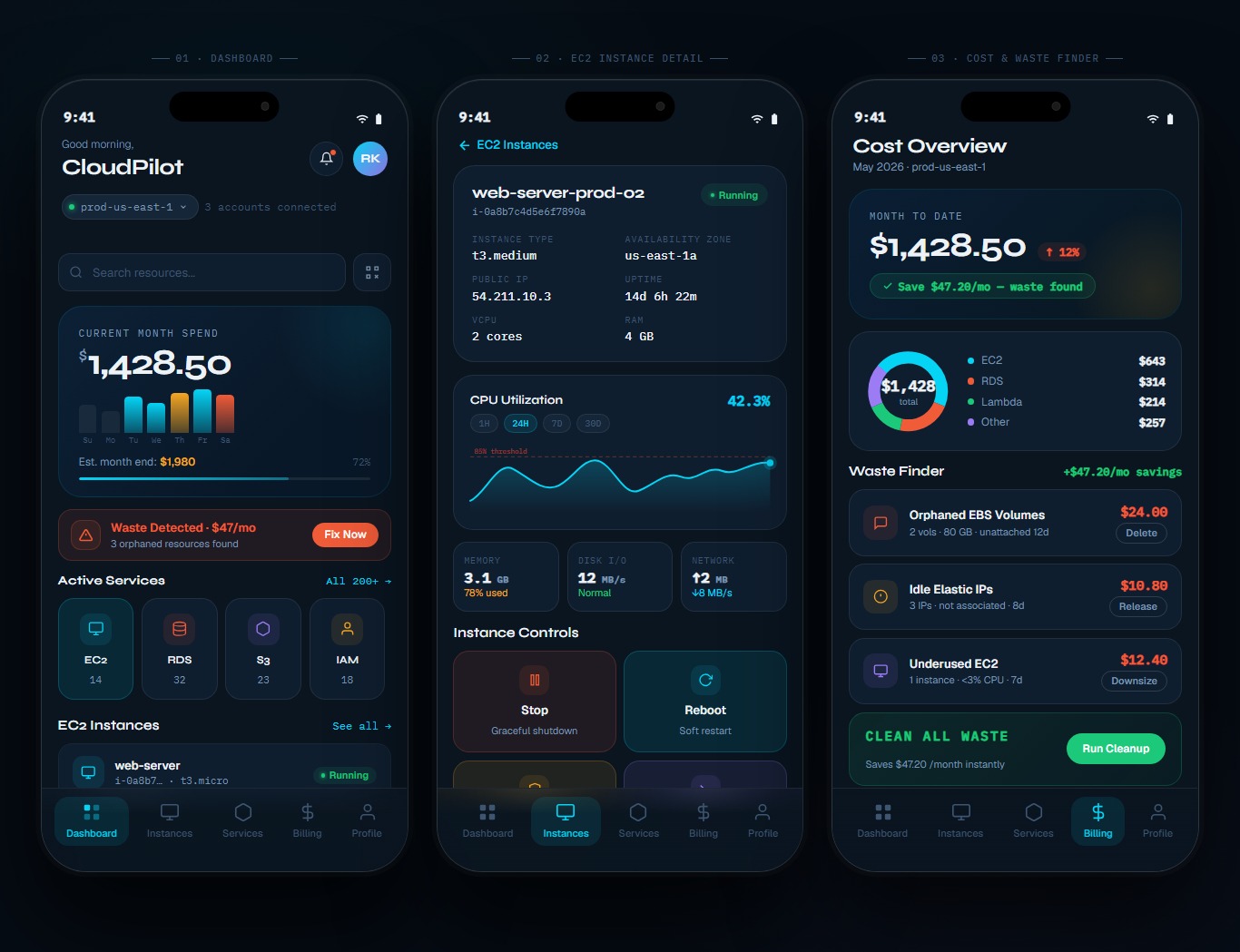
Find Wasted AWS Spend in Seconds

Scan for orphaned EBS volumes, idle Elastic IPs, underutilized EC2 instances (under 5% CPU over 7 days), and EBS snapshots older than 90 days. Each item shows its exact estimated monthly cost. Delete with one tap and a confirmation dialog.

  • Orphaned EBS volumes (unattached)
  • Idle Elastic IPs (~$3.65/mo each)
  • Underutilised EC2 (under 5% CPU, 7 days)
  • Old snapshots (90+ days, configurable)

IAM Security Score - Know Your Risk

A 0-to-100 security score across all IAM users in your AWS account. See who has no MFA enabled, which access keys are older than 90 days, and which policies are over-permissive. Direct links to the AWS IAM console for immediate remediation.

  • Security score 0-100
  • MFA status per IAM user
  • Access key age alerts (90 / 180 day)
  • Links to AWS IAM console for remediation

Push Alerts for CloudWatch Alarms & Billing Spikes

Real-time push notifications when a CloudWatch alarm fires, your monthly spend hits a threshold, or an EC2 instance changes state. Delivery target: under 10 seconds from alarm trigger. Categorized as CRITICAL or HEALTHY in the Alert Centre.

  • CloudWatch alarm state changes
  • Billing spike alerts (configurable $)
  • EC2 instance state change notifications
  • CRITICAL vs HEALTHY categorisation

Scale Your Infrastructure From Your Phone

View Auto Scaling Group health (desired vs. actual capacity) and update desired, minimum, and maximum values on the fly. Handle traffic spikes or scale down to zero without opening the AWS Console.

  • View desired vs. actual ASG capacity
  • Update desired / min / max values
  • Real-time capacity change feedback
  • Handle traffic spikes on the go

6-Month AWS Spend Trends at a Glance

Current month spend card, a 6-month bar chart of cost trends, and a per-service cost breakdown fetched live from AWS Cost Explorer. Set monthly budget alert thresholds that push-notify you at 80% and 100% of your limit.

  • Current month spend card
  • 6-month cost trend bar chart
  • Top 5 services by spend
  • Budget threshold push alerts (80% + 100%)

Switch Between AWS Accounts in One Tap

Connect unlimited AWS accounts and switch between them from the bottom sheet. Each account is color-coded. Hot-swap between accounts: EC2, S3, RDS, Lambda, alarms, and costs update instantly. Aggregate spend view across all accounts.

  • Unlimited accounts (Pro)
  • Color-coded account switcher
  • Hot-swap: no re-login required
  • Aggregate cross-account cost view

Every Action Logged In-App and in AWS CloudTrail

AWS Console Manager logs every write action (start, stop, scale, delete) with timestamp, account, and region inside the app. All actions are simultaneously recorded in AWS CloudTrail in your account. Filterable by service, date, and action type.

  • In-app activity history with timestamps
  • CloudTrail integration (your account)
  • Filter by service / date / action type
  • Satisfies basic compliance audit requirements

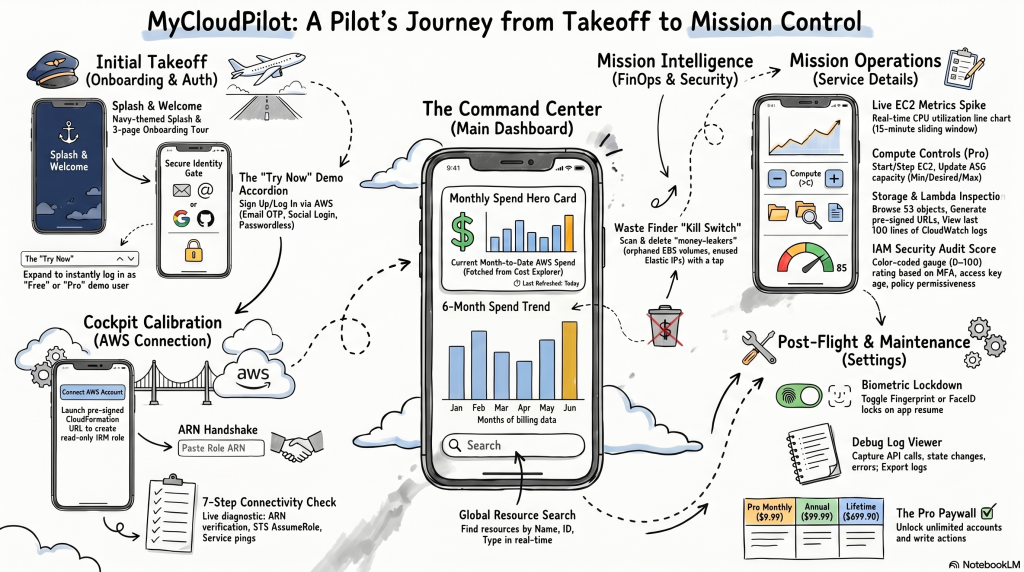
Connect Your AWS Account in Under 10 Minutes

  1. Install & Connect

    Install from your marketplace, connect your account, and follow the guided setup wizard. Takes less than 5 minutes.

  2. Configure & Customize

    Set up your workflows, configure integrations, and customize settings to match your exact requirements.

  3. Launch & Scale

    Go live with confidence. Monitor performance in real-time and scale seamlessly as your team grows.

How it works screenshot

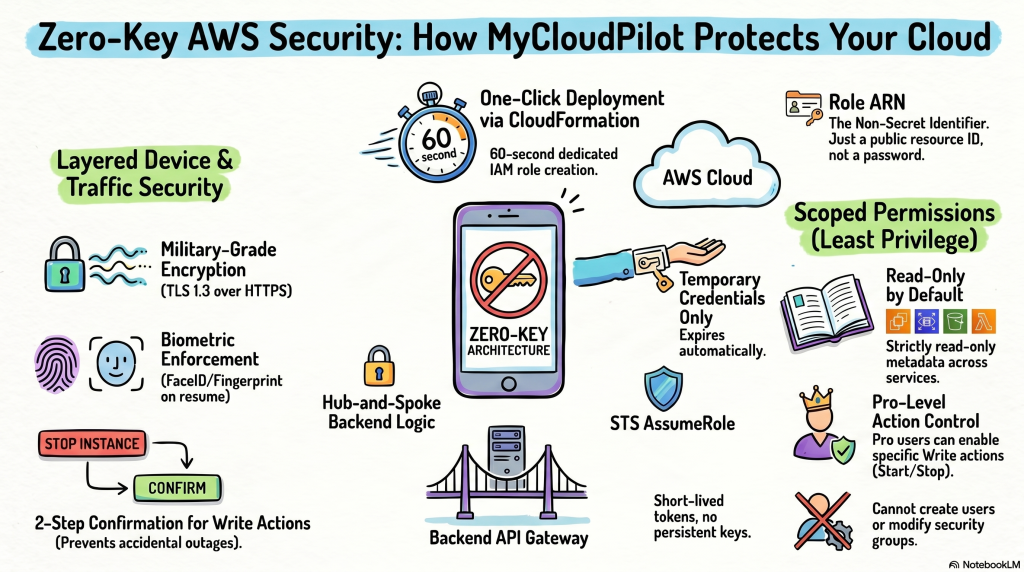
Zero-Key AWS Security - No Access Keys Stored on Your Device

Most mobile AWS tools ask you to paste your AWS Access Key ID and Secret. AWS Console Manager uses a different architecture. Your AWS Access Keys never touch the device.

  • Deploy via CloudFormation: Creates one IAM role in your account in 60 seconds.
  • Paste only the role ARN - a non-secret resource identifier, not a credential.
  • STS AssumeRole: The app backend uses temporary credentials on your behalf. Your keys stay in your account.

All traffic uses HTTPS/TLS 1.3. Biometric lock enforced on every app resume. 2-step confirmation on all write actions.

Zero-Key AWS Security - No Access Keys Stored on Your Device

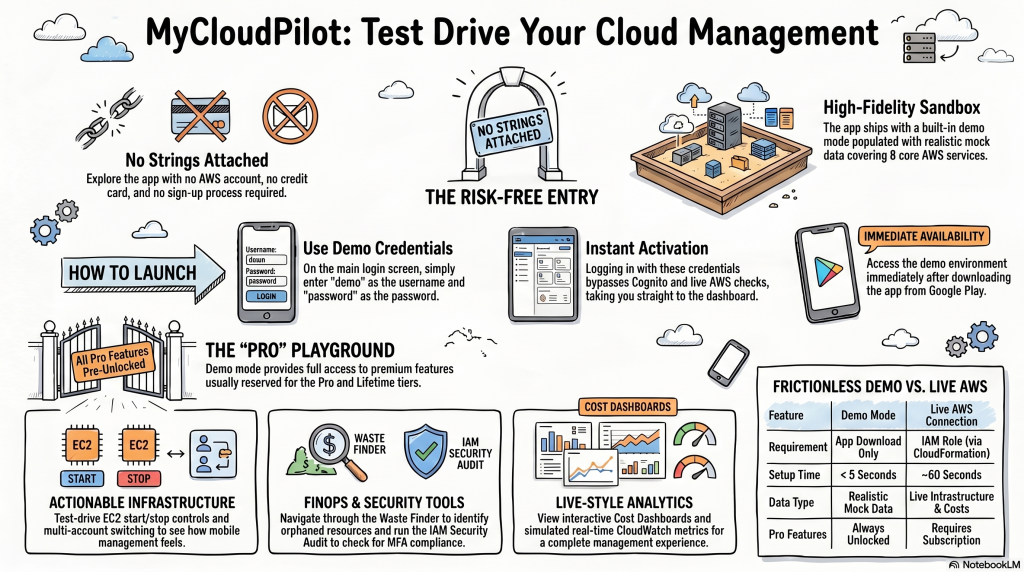
Not Ready to Connect Your AWS Account? Try the Demo.

AWS Console Manager ships with a built-in demo mode populated with realistic mock data.

Log in with demo / password on the login screen and explore every Pro feature: EC2 controls, Waste Finder, IAM Security Audit, Cost Dashboard, multi-account switching. No AWS account, no credit card, no sign-up required.

  • All Pro features pre-unlocked in demo mode
  • Realistic mock data covering all 8 core services
  • Available immediately after downloading from Google Play
Not Ready to Connect Your AWS Account? Try the Demo.

Connects to Your Existing AWS Stack

EC2
S3
RDS
Lambda
CloudWatch
Cost Explorer
IAM
Auto Scaling
CloudFormation
AWS STS
AWS Cognito
Firebase FCM

Loved by teams worldwide

★★★★★
I was on call at 11pm, got a CloudWatch alarm push on my phone, opened the app, and stopped the runaway EC2 instance in three taps. It was back up before I could open my laptop lid.
Senior DevOps Engineer
SaaS Startup, AWS Production Environment
★★★★★
I manage eight client AWS accounts. The multi-account switcher alone is worth the Pro subscription. I can check costs and running instances for all eight clients in under two minutes, from my phone, between meetings.
AWS Certified Solutions Architect
Independent Cloud Consultant
★★★★★
The Waste Finder found $340 in orphaned EBS volumes and idle Elastic IPs in my staging environment the first time I ran it. The Pro subscription paid for itself in three minutes.
CTO
Early-stage B2B SaaS Startup

Free to Start. Pro with 7-Day Trial. Enterprise for Teams.

Every new account includes a 7-day free Pro trial — no credit card required.

Free

Single AWS account, read-only visibility + basic controls

  • $0 / month - always free
  • 1 AWS account
  • EC2 list + 1 start/stop per session
  • S3, RDS, Lambda - read-only
  • CloudWatch alarm list
  • Basic push alerts
  • Dashboard with live spend card
  • Demo mode included

Free to download · No AWS keys stored on device · 7-day Pro trial included

Lifetime

All Pro features, no recurring payments, all future updates

  • $699.90 one-time payment
  • All Pro features included
  • All future Pro updates included
  • No subscription or renewal
  • Unlimited AWS accounts
  • Full feature access forever

Free to download · No AWS keys stored on device · 7-day Pro trial included

8
AWS Services Managed
200+
AWS Services in Catalog
<10 min
Setup via CloudFormation
Zero
AWS Credentials Stored on Device

Frequently Asked Questions

AWS Console Manager is currently available on Android only via Google Play. An iOS version is in development. The iOS Coming Soon button on this page will be updated with an App Store link at launch.

No. AWS Console Manager uses a Zero-Key architecture. You deploy a CloudFormation template that creates an IAM role in your account. The app stores only the role ARN - a non-secret identifier. All AWS API calls are made by the backend Lambda using STS AssumeRole. Your access keys never leave your AWS account and never touch your device.

Under 10 minutes for most users. The steps: download the app, create an account, tap Connect AWS Account, open the CloudFormation link, deploy the stack (approximately 60 seconds), and paste the role ARN back into the app. A live 7-step connectivity check confirms each service is reachable.

Every new account includes a 7-day free trial of the Pro tier automatically - no credit card required. During the trial you have full access to Waste Finder, IAM Security Audit, multi-account switching, and all Pro features. At the end of the trial, the app reverts to the Free tier unless you subscribe.

Yes. AWS Console Manager includes a built-in demo mode with realistic mock data. On the login screen, log in with username: demo and password: password. Every Pro feature is pre-unlocked in demo mode so you can evaluate the full product without an AWS account, sign-up, or payment details.

Core services (Free and Pro): EC2, S3, RDS, Lambda, CloudWatch, Auto Scaling Groups, IAM, and Cost Explorer. Pro users can browse a catalog of 200+ AWS services. Additional deep management features for EKS, Route 53, and DynamoDB are on the roadmap.

Waste Finder scans your AWS account for resources costing money but doing no useful work: orphaned EBS volumes not attached to any instance, Elastic IPs not associated with a running resource, EC2 instances with under 5% average CPU over 7 days, and EBS snapshots older than 90 days. Each item shows its estimated monthly cost. Pro users can delete resources with one tap and a confirmation dialog.

AWS Access Keys are never requested or stored. Authentication uses AWS Cognito with mandatory MFA. All API traffic uses HTTPS/TLS 1.3. Session tokens are stored using flutter_secure_storage with Android Keystore. Biometric lock is enforced on every app resume. Firebase Analytics and Crashlytics receive only usage events and crash reports - no AWS resource data.

Your account reverts to the Free tier at the end of your billing period. No cancellation fee. You keep access to 1 AWS account with read-only visibility of core services and basic EC2 controls. Your account settings, role ARN, and preferences are preserved. Re-subscribe at any time to restore full Pro access immediately.

Yes. An Enterprise plan with AWS Organizations support, role-based team management, DynamoDB audit logs, bulk operations, and budget forecasting is available. Contact support@mycloudpilot.com for Enterprise pricing and setup.

Your AWS Infrastructure — In Your Pocket.

Free to download. Connect your AWS account in under 10 minutes. 7-day Pro trial included with every new account — no credit card required.

Free to download · No AWS keys stored on device · 7-day Pro trial included

Scroll to Top