Three Filter Modes
Unread only, Read only, or show All. Switch instantly — no Gmail searches, no manual filters, no page reload.
- Unread — see only emails needing attention
- Read — review processed emails
- All — full Gmail view restored

Unreadify adds a one-click toggle to Gmail — instantly switch to Unread only, Read only, or All emails. Works across every inbox, label, category, and nested folder. Now includes advanced date & focus filters. Zero data collected. Free forever.
Free forever · v1.2.0 · Zero data collection · Chrome, Edge & Brave
Free on Chrome Web Store — Install in 30 Seconds
No account. No login. No permissions beyond Gmail itself.
Free forever · v1.2.0 · Zero data collection · Chrome, Edge & Brave
Unread only, Read only, or show All. Switch instantly — no Gmail searches, no manual filters, no page reload.
Primary inbox, all custom labels, nested labels (2+ levels deep), Gmail category tabs (Promotions, Social, Updates, Forums), and reading pane / split view.
Narrow your filtered view to emails from today or yesterday. Combine Unread + Today for a zero-noise morning triage. Free in v1.2.
Cut CC noise instantly. Filter to emails addressed directly to you. Combine with Unread + Today for your most urgent triage. Free in v1.2.
Auto-detects Gmail's dark or light theme and adapts the filter dropdown and toast notifications to match perfectly — no configuration needed.
Recognises when you type your own Gmail searches and suspends auto-filtering automatically. Resumes when you navigate back — zero interference.
Your email content is never accessed, read, or transmitted. Only your filter preference is stored locally in Chrome sync storage (under 1KB).
Opens Gmail in Unread mode on every session. Start each day focused on emails that need your attention — not the ones you already handled.
Install from your marketplace, connect your account, and follow the guided setup wizard. Takes less than 5 minutes.
Set up your workflows, configure integrations, and customize settings to match your exact requirements.
Go live with confidence. Monitor performance in real-time and scale seamlessly as your team grows.
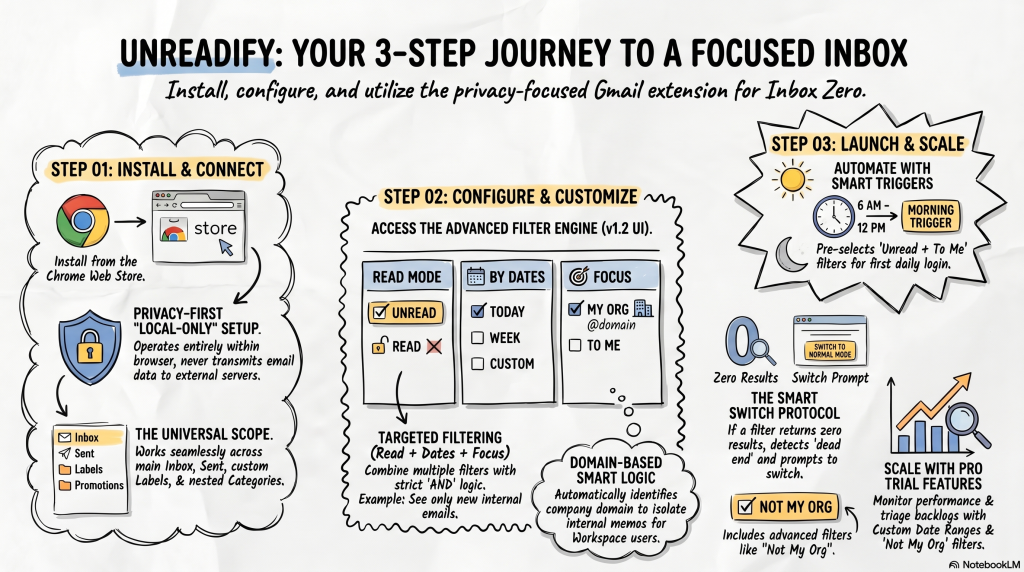
Unreadify uses Gmail's own URL filtering mechanism — the same approach Gmail uses internally for label navigation. No email content is ever accessed, no data is sent to any external server, and no analytics are collected.
The only data stored is your filter mode preference (Unread / Read / Normal), saved locally in Chrome's sync storage (under 1KB). No login. No account. No servers.
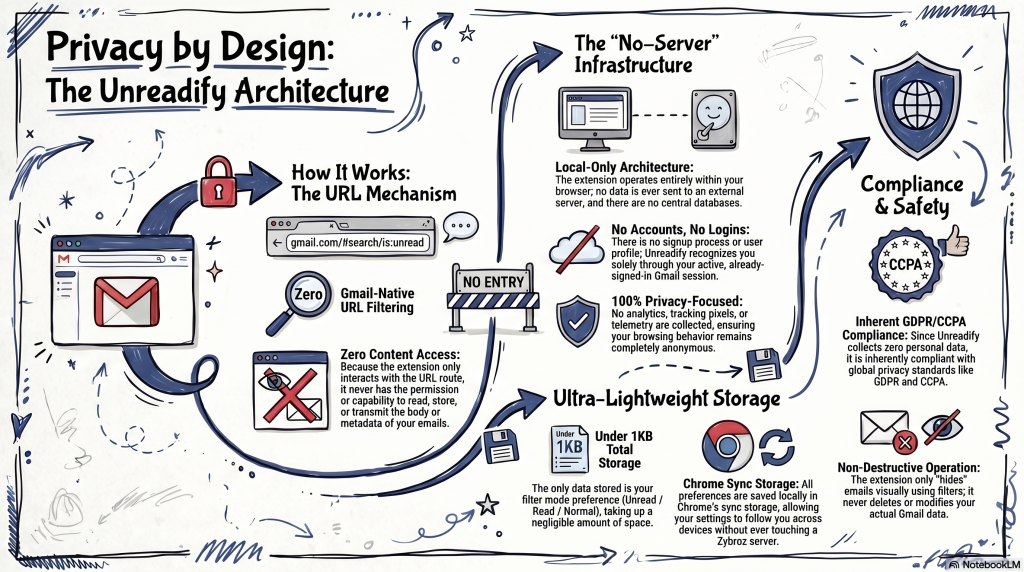
Works across every part of Gmail: primary inbox, all custom labels you've created, Gmail's category tabs (Promotions, Social, Updates, Forums), nested labels multiple levels deep, and reading pane / split view mode.
Thread view is handled intelligently — switching filter modes while reading an email automatically returns you to the filtered list, preserving your current label or category context.
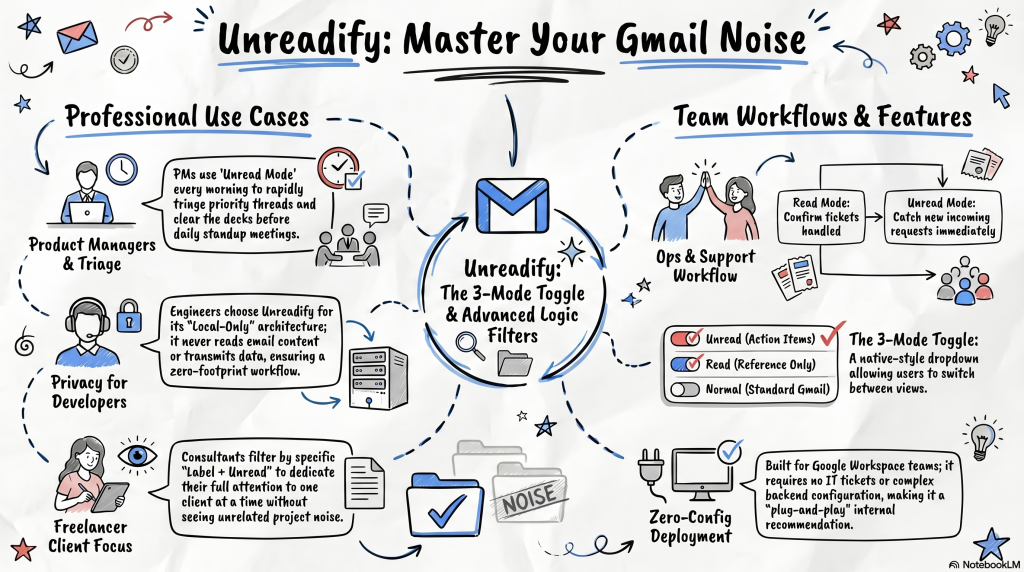
v1.2 ships an advanced filter popup alongside the one-click toggle. Date filters narrow your view to Today or Yesterday. The Focus filter To Me shows only emails addressed directly to you — cutting CC'd and BCC'd noise in one click.
Combine any mode with any filter: Unread + Today + To Me = only your unread emails from today that need a reply. Coming in v2.0: extended date ranges (Week, Month, Custom), My Org / External sender filters, unlimited saved presets, and keyboard shortcuts.
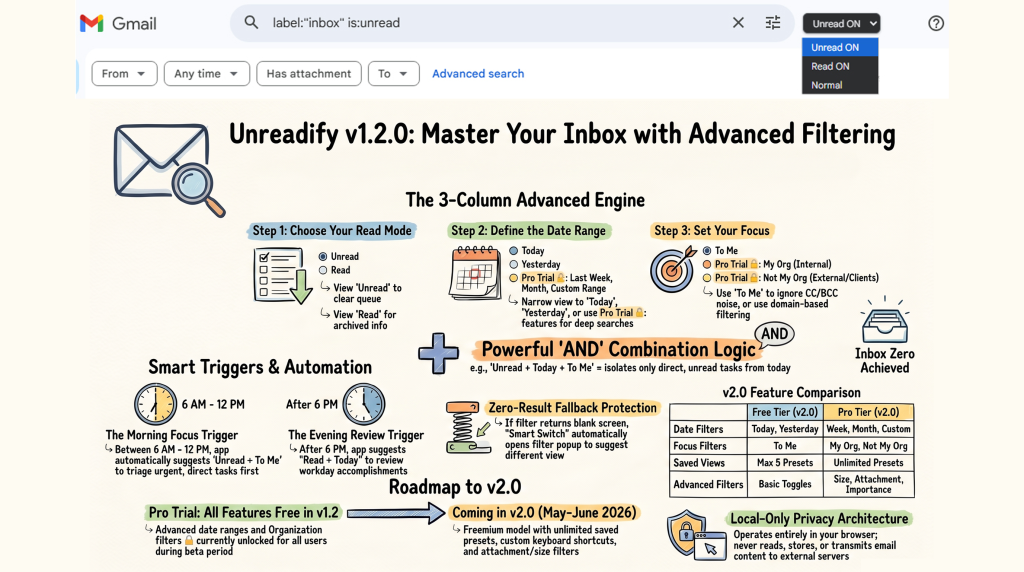
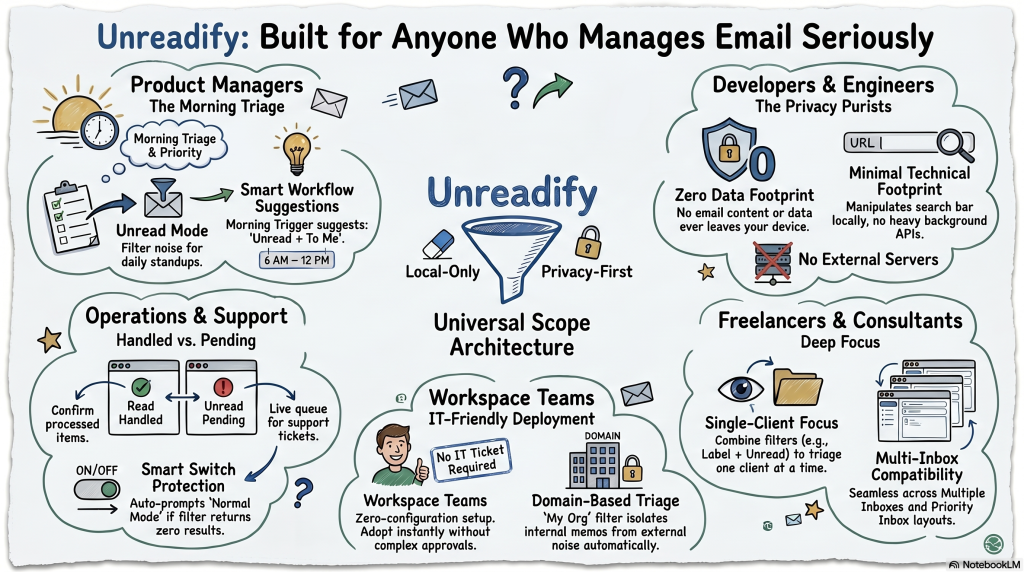
Unreadify for Gmail is used daily by professionals across every function — anywhere email volume creates noise:
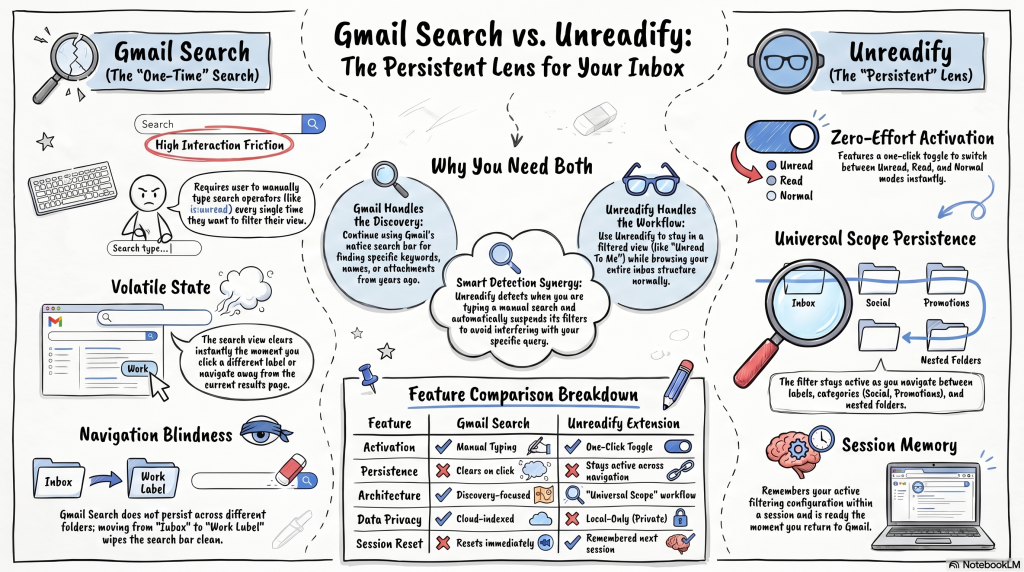
Gmail search is powerful — but it's not designed for persistent inbox filtering. Here's the difference:
Unreadify doesn't replace Gmail search — it handles the workflow it can't: staying in a filtered view while you browse your inbox normally. Think of it as a persistent lens over Gmail, not a one-time search.
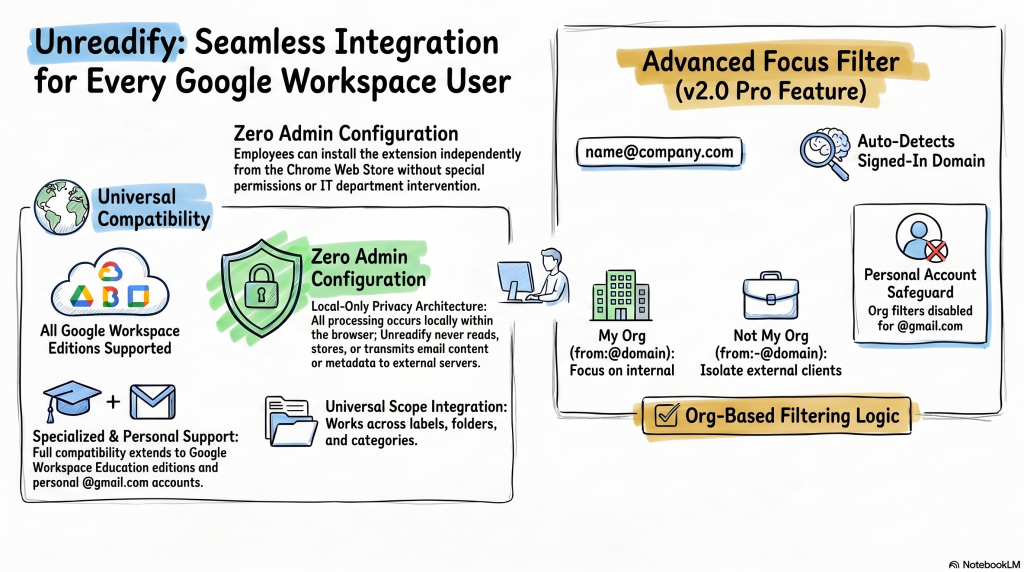
Unreadify works with every Google Workspace edition out of the box. No admin configuration. No special permissions. Employees can install it independently from the Chrome Web Store.
The advanced Focus filter automatically detects your signed-in domain for org-based filtering in v2.0.
I open Gmail every morning and the first thing I see is only my unread emails. Sounds simple but it completely changed how I start my day. I get through email in 15 minutes instead of an hour.
Checked the extension source u2014 it genuinely only touches the URL. No scary permissions, no data collection, no servers. Does exactly one thing and does it right.
Showed my whole team and they all installed it in the same Zoom call. The zero-configuration setup is a big deal when you manage a busy team.
Core filtering and v1.2 advanced filters are free forever. Lifetime and Pro unlock extended ranges, saved presets, and keyboard shortcuts in v2.0.
Everything you need — available now
Free forever · v1.2.0 · Zero data collection · Chrome, Edge & Brave
Pay once. Use forever. All Pro features.
Free forever · v1.2.0 · Zero data collection · Chrome, Edge & Brave
Monthly or annual — cancel anytime
Free forever · v1.2.0 · Zero data collection · Chrome, Edge & Brave
Getting started is simple. Visit our marketplace listing, click Install, and follow the guided setup wizard. You'll be up and running in under 5 minutes with our pre-built templates.
Yes — we offer a 30-day free trial with full access to all Pro features. No credit card required to start. You can upgrade at any time during or after the trial period.
We integrate natively with 200+ tools including AWS, Google Cloud, Slack, GitHub, Jira, Salesforce, and more. Custom integrations are available via our REST API and webhooks.
We use AES-256 encryption for all data at rest and in transit. We are SOC 2 Type II certified and GDPR compliant. Your data is never shared with third parties.
Absolutely. No long-term contracts, no cancellation fees. Cancel anytime from your account dashboard. Your data remains accessible for 30 days after cancellation.
Yes — our Agency plan includes a dedicated account manager, custom SLA agreements, priority support, and optional white-label configuration. Contact us for enterprise pricing.
Yes. All plans receive automatic updates for the duration of your active subscription. Update notes are published in our changelog with each release.
Step-by-step guides, API reference, tutorials, and everything you need to get the most out of Unreadify for Gmail.
Read the DocsStay up to date with the latest features, bug fixes, and improvements. Release notes for every version.
View ChangelogHave a question or hit a snag? Our support team and community are ready to help you succeed.
Contact SupportInstall Unreadify in 30 seconds. One-click toggle between Unread, Read, and All. Advanced date & focus filters included free. No account. No data collected. No credit card. Works on Chrome, Edge, and Brave.
Free forever · v1.2.0 · Zero data collection · Chrome, Edge & Brave